Entering ROW-TRAK Calibration Mode
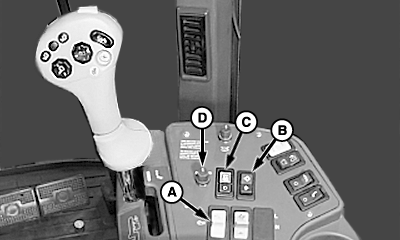
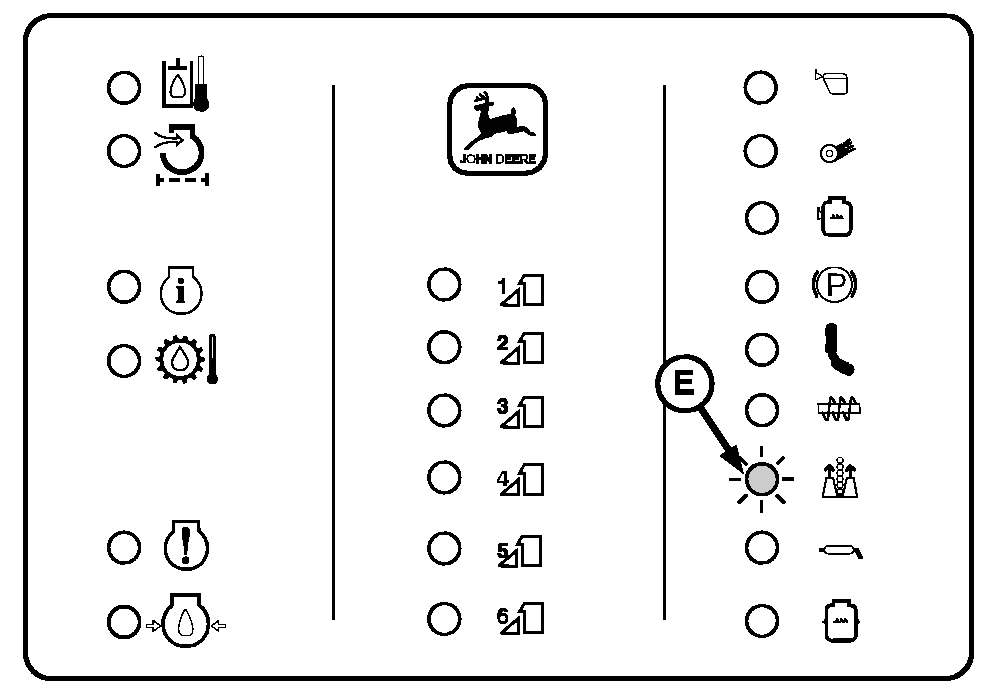
Entry to the calibration (cal) mode must be made if there is a need to access any of the performance, valve biasing, or diagnostic channels (1-10). 1. Start engine and run at low throttle.2. Place fan/units switch (A) in the ON position. 3. Raise engine speed above 1800 rpm. 4. Sit squarely on seat. 5. Hold the cal/learn switch (B) in the learn position (push down on the lower half of the switch) WHILE turning on the ROW-TRAK on/off switch (C). The ROW-TRAK indicator light (E) will flash. Continue holding the cal/learn switch down until a two digit channel number (1-10) appears in the tachometer display. NOTE: Error code 120 will normally appear on tachometer display when entering the ROW-TRAK calibration mode. 6. Release cal/learn switch. 7. To change channels on tachometer display as desired, push and hold the cal/learn switch in the cal position (push down on the upper half of the switch) and rotate the offset adjust knob (D) then release the cal/learn switch. NOTE: Channels 1-4 and 6-10 are for performance or diagnostic purposes only and DO NOT have to be entered when calibrating ROW-TRAK system for first time operation. (See Performance Channels- 1 And 2, Perform ROW-TRAK Automatic Valve Biasing-channel 5, And Diagnostic Channels-6-10 in this section for descriptive function of channel numbers). |
|
 CAUTION:
To avoid injury or death to you or others caused by sudden movement in rear guide wheels, stay clear of rear of machine while performing this check.
CAUTION:
To avoid injury or death to you or others caused by sudden movement in rear guide wheels, stay clear of rear of machine while performing this check.
OUO6043,0001460 -19-02MAY05-1/1 |