Cleaning Rotary Screen, Oil Cooler, Fuel Cooler, Condenser, Radiator and Air-to-Air Cooler
|
|||||
OUO6043,000149F -19-03MAY05-1/4 |
|
|
|
 CAUTION:
Sudden movement of rotary screen or machine can cause serious injury or death to you or others. Turn off engine and remove key before cleaning rotary screen and cooling package.
CAUTION:
Sudden movement of rotary screen or machine can cause serious injury or death to you or others. Turn off engine and remove key before cleaning rotary screen and cooling package.


OUO6043,000149F -19-03MAY05-2/4 |
|
1.
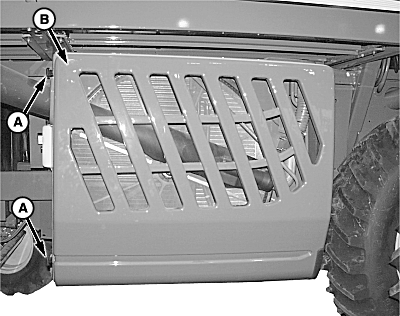
Release latches (A) and open rotary screen door (B).
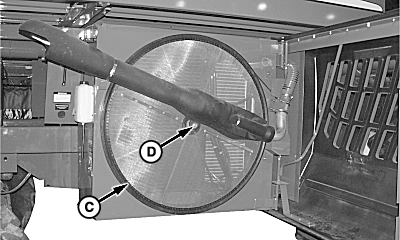
NOTE: When using compressed air to clean rotary screen, blow from the inside of screen out. 2. Remove all dirt, trash and lint from rotary screen (C) and rotary screen axle (D) using a brush and compressed air. 3. Verify rotary screen rotates freely.
|
|
OUO6043,000149F -19-03MAY05-3/4 |
|
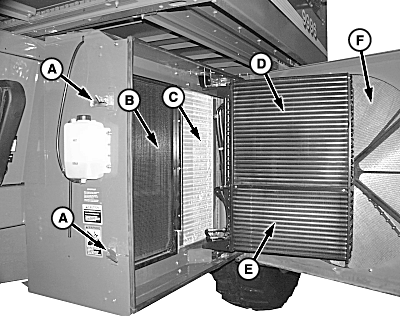
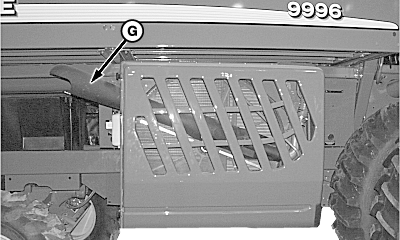
IMPORTANT: Avoid fin damage when using high pressure air or water when cleaning cooling cores. Use a fin comb to straighten bent fins. Bent fins will decrease cooler performance. 4. Release latches (A) and open cooling package. 5. Clean cooling cores (B-E) and inside of rotary screen (F) using a brush and compressed air as necessary. 6. Close cooling package. 7. View down barrel of trash expeller (G) and clean as necessary.
|
|
OUO6043,000149F -19-03MAY05-4/4 |