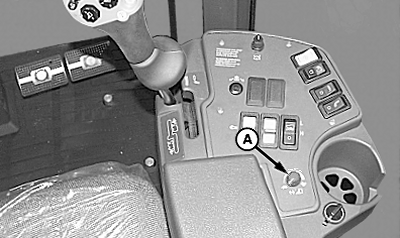
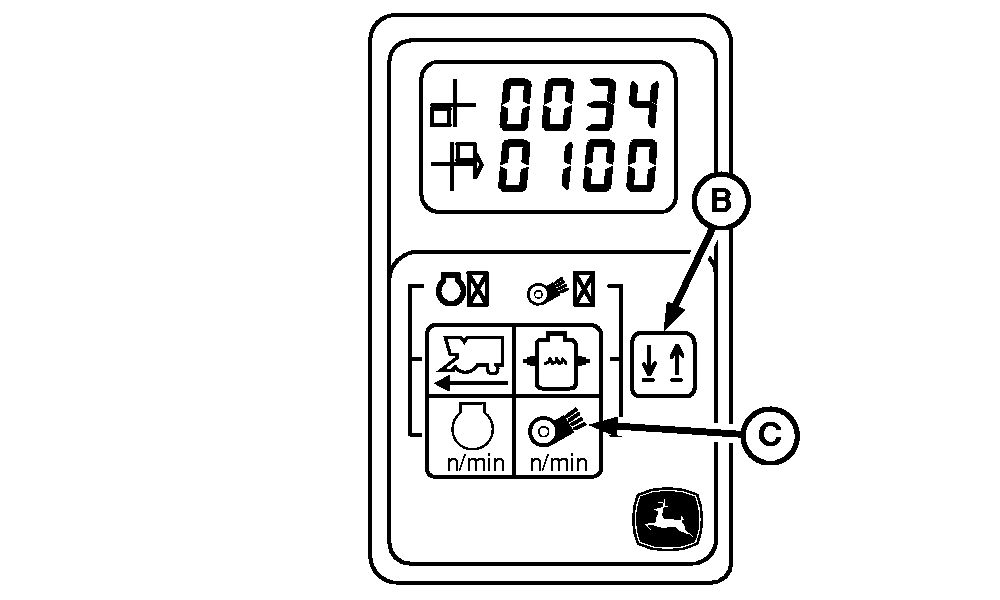
Adjust Initial 10 Second Response Rate-Address 34NOTE: In extreme operating conditions it may be necessary to deactivate the initial rate of response routine. Set the value in diagnostic address 34 to 0 to eliminate bounce when entering the row. When the header height response rate control knob (A) is positioned at a minimum response rate, the header height control system may not respond fast enough to the abrupt change in ground height when first entering the row. The response rate for the initial 10 seconds the system is activated can be adjusted through the tachometer. After 10 seconds the system reverts back to the response rate defined by the response rate control knob (A). The initial 10 second response rate value is located in address 34 of the tachometer. Perform the following procedure to adjust response rate value: 1. Enter diagnostic mode. (See ENTERING HEADER HEIGHT CONTROL DIAGNOSTIC MODE in this section.)2. Press line select switch (B) until address 34 is reached. 3. Press fan speed switch (C) to change the value. Value can be changed from 0 to 100 percent in increments of 10. 100 (shown on bottom line) being maximum response rate. 4. Turn key switch off to retain setting. |
|
OUO1078,000055D -19-14FEB07-1/1 |