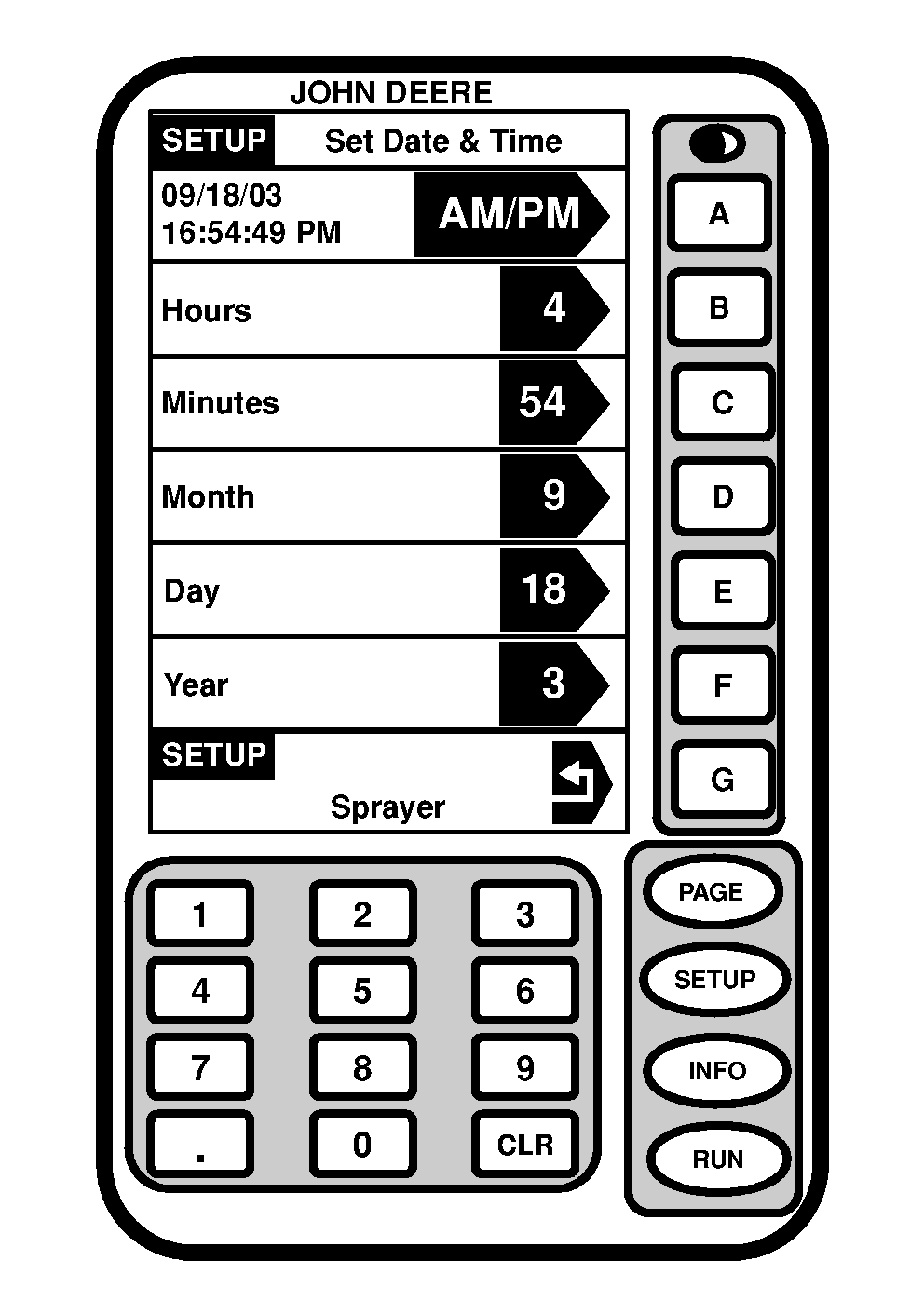
Setting Time and Date1. Press "SETUP" to display SETUP menu.2. Press letter button next to "SprayerStar". 3. Press "PAGE" twice to display SETUP- Sprayer Page 3 menu. 4. Press letter button next to "Set Date & Time". 5. Press letter button next to "AM/PM" to change from one to other. 6. Press letter button next to "Hours". 7. Enter the desired hours (1-12). 8. Press letter button next to "Hours" to save this value. 9. Press letter button next to "Minutes". 10. Enter the desired minutes (01-59). 11. Press letter button next to "Minutes" to save this value. 12. Press letter button next to "Month". 13. Enter the desired month (1-12). 14. Press letter button next to "Month" to save this value. 15. Press letter button next to "Day". 16. Enter the desired day (1-31). 17. Press letter button next to "Day" to save this value. 18. Press letter button next to "Year". 19. Enter the desired year (3- ). 20. Press letter button next to "Year" to save this value. 21. Press letter button next return icon to return to "SETUP-Sprayer" or "RUN" to return to Page 1 of the RUN menu. |
|
OUO6092,000061E -19-22JUN04-1/2 |
| 22. Press "RUN" to return to RUN mode. |
OUO6092,000061E -19-22JUN04-2/2 |