Input FieldsThere are a variety of input fields and buttons that allow the operator to navigate through the screens on the display and input values:
2600 Display-fields are selected by touching screen. Key pad will appear to input alpha/numeric data. |
OUO6092,0000D3D -19-01FEB07-1/5 |
|
|

|
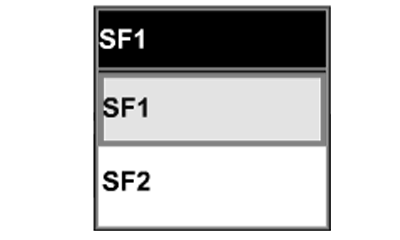
Drop-Down Box
A drop-down box has a border with a numeric or text value and up/down arrows on the right side that allow operator to select a prepopulated item pre-populated in a list. To open, touch drop-down box and list will appear. Move highlight focus through list to desired input value |
by touching Up and Down arrows. Touching new selection to enter value.
To close the drop-down box without making a new selection, press original value from list. List will close and original value will remain. |
OUO6092,0000D3D -19-01FEB07-2/5 |
|
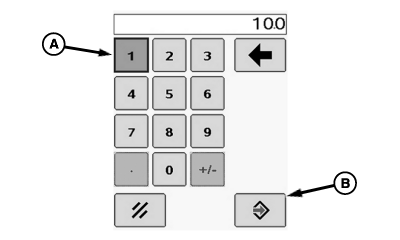
Input Box
An Input box has a border with a numeric value or text. This allows the operator to select and enter new values or text. touch the input box to be changed and a numeric key pad (A) will appear, allowing selection of each digit. Press Enter button (B) to accept new value.
|
|

OUO6092,0000D3D -19-01FEB07-3/5 |
|
Check Box
A check box is a square with a border. A check mark in the box indicates that the box is activated. To activate a check box, touch the empty check box. A check will appear inside box activating the item. To deactivate a check box, touch check box to remove the check. |
|

OUO6092,0000D3D -19-01FEB07-4/5 |
|
Button
A Button is an icon or text with a border. Activating a button will perform that icon's function. To activate a button, touch the button. |
|


OUO6092,0000D3D -19-01FEB07-5/5 |