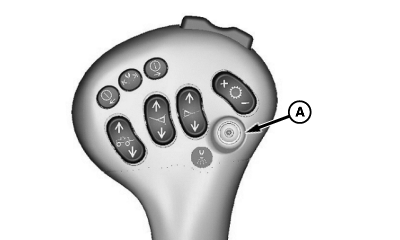
Setup Boom ChargeBoom charge allows the operator to charge the boom at a manually specified or automatically calculated pressure (Boom Charge Pressure) for 3 seconds after the Master Spray ON/OFF switch (A) is pressed "ON". After 3 seconds, the automatic rate control system will take over. This allows the spray rate control system to reach the target application rate faster when smaller flow rate nozzles are used. In SprayStar setup, place boom charge in "AUTO" when solution flow rate is under 100 Lpm (26 gpm). To Determine Solution Flow Rate:
OR
|
|
OUO6092,0000D71 -19-28MAR07-1/2 |
|
|
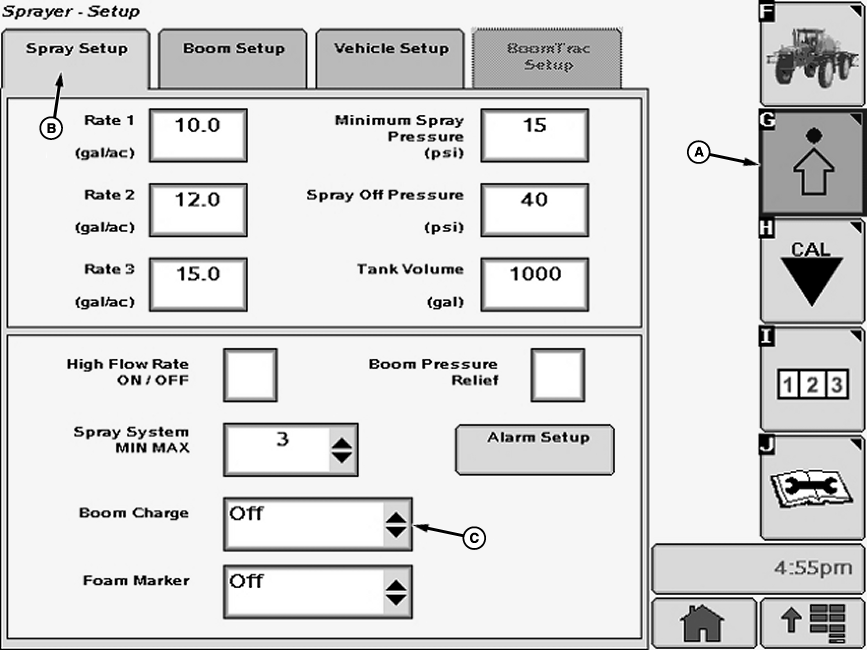
To place boom charge in AUTO or OFF: 1. Select the Setup softkey (A) to view the setup menu.2. Select the Spray Setup tab (B). 3. Select drop-down box (C) next to "Boom Charge" and select between "AUTO" or "OFF". NOTE: ACD values (Solution System Response) are calculated on the first spray pass made through field after each time the engine has been started. To insure valid ACD numbers, |
make the first spray pass at a constant speed, with all boom sections turned on and the correct nozzle size for the target rate selected. Changing speed or shutting off boom sections during the first spray pass can result in invalid ACD values and incorrect boom charge that cause application rate problems. If the machine fails to make a stable rate in a timely fashion after the first pass, the ACD values may be invalid. Reset the values by shutting-off the machine, restarting and make another spray pass. ACD values need to be reset each time nozzle size is changed. |
OUO6092,0000D71 -19-28MAR07-2/2 |