Importance of Checking Quantities DrilledThe following variables affect the rates as shown on the rate charts: 1. Quality of Seed-Two bags of seed that weigh the same may have different quantities of seed because of moisture content, trash, unfilled kernels, or simple seed size.2. Wheel Slippage-It can vary depending on tire size, seed bed condition, soil type, and load in machine. Speed also affects wheel slippage. 3. Tires-Size, type, and air pressure affect seeding rates. Use the recommended tire size and proper air pressure in the chart. 4. Operator Judgment-Land contains more or less area than assumed. Overlapping rows or leaving too wide a space between rows. Turning at row ends without lifting furrow openers.
|
AG,OUO1018,53 -19-01APR99-1/2 |
|
5.
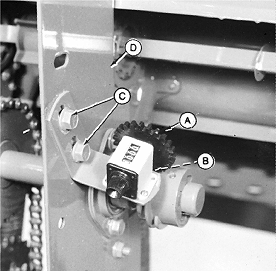
Acremeter-Worn out counter gear (A) or chipped teeth. Worm gear loose on shaft.
6. Use the following checklist to be sure the meter is functioning properly:
7. Changing to a smaller gear (less teeth) will speed up the meter reading. IMPORTANT: Gear teeth should mesh with drive worm gear (B), but should not "bottom" on drive worm or machine damage can result. The attaching holes in the support bracket (D) are slotted. Loosen cap screws (C) and move acremeter, bracket, and attaching cap screws on support bracket to make adjustment. NOTE: One acremeter is installed on left-hand section for 25 ft machines and on right-hand section for 30 ft and 35 ft machines. |
|
AG,OUO1018,53 -19-01APR99-2/2 |