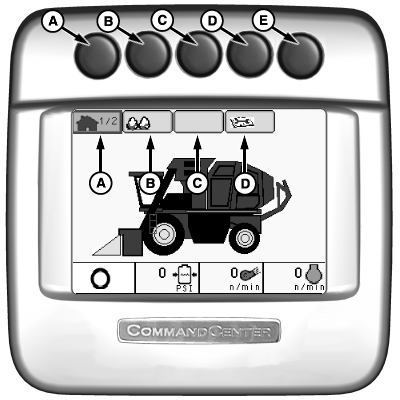
Armrest Display Unit (ADU) Home Page NavigationPress button (A, B, C, or D) to select desired type of information to view or change. Corresponding icon on display will highlight and show number of available pages within that selection. Once information type is selected, press button again to advance through available pages. See Operator Interface Controls section for alternate navigation method. Details on each of these pages are given in the 7760's Operators Manual. |
|
| Display Navigation | ||
|---|---|---|
| Button | PAGE 1 | PAGE 2 |
| (A)-Home | View Harvest Monitor information, crop, and machine settings | Viewable machine settings (6 operator selected status windows) |
| (B)-Setup | View and edit wrap settings and module size | Set compactor mode |
| (C)-Not Used | Not Used On Home Page | |
| (D)-Hours | Displays engine and fan hours | |
| (E)-Not Used | Not Used On Home Page | |
|
In some instances, a diagnostic screen may appear upon startup. Acknowledge code(s) by pressing the checkmark/enter button once for each. Reference any messages using the machines Operators Manual or, if necessary, contact your John Deere Dealer. |
NS43404,0000057 -19-27OCT08-1/1 |