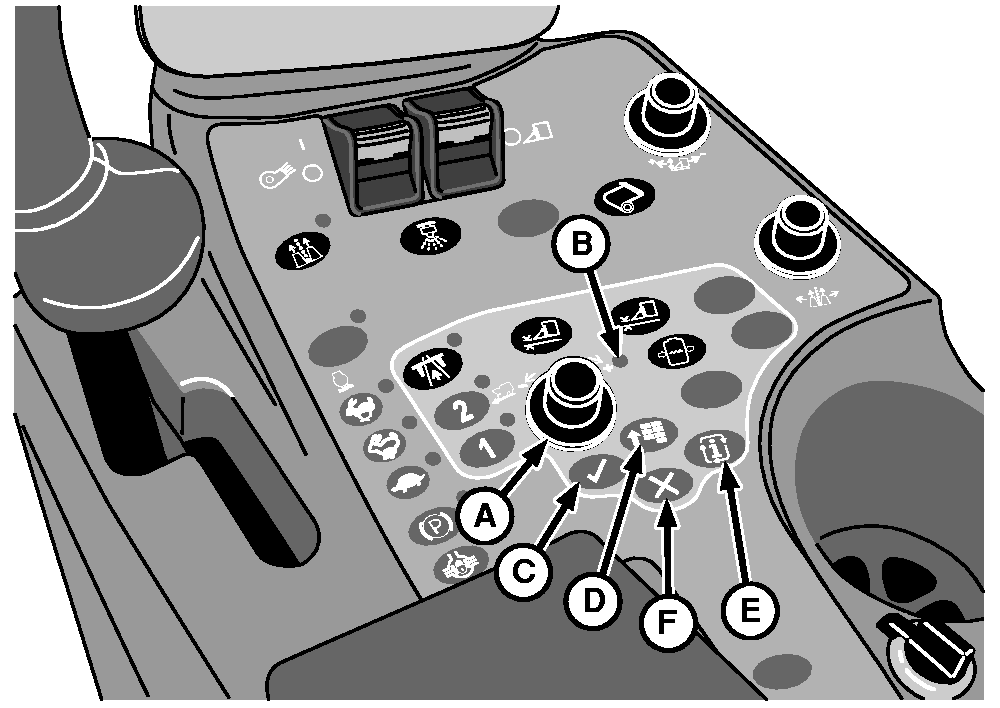
Operator Interface ControlsSelection Dial Selection dial (A) allows operator to move the "focus" from item to item on the Armrest Display Unit (ADU). As item is highlighted, a "tool tip" will appear describing what the highlighted object is. Display/setpoint dial is also used for data entry to increase/decrease numeric values. Indicator Light (Green) Indicator light (B) indicates that a button was selected and now can be adjusted to the operator desired position or setting. Confirm Button (Green) Confirm button (C) allows the operator to select the desired "focus" area on the Armrest Display Unit (ADU) or to confirm an action. Main Menu Button (Green) Main menu button (D) is used to change the active "application" that the Armrest Display Unit (ADU) is running. Items or applications, in the menu included:
Mode Select Button (Green) Mode Select button (E) activates the mode selection screen on the Armrest Display Unit (ADU). The mode selection screen will allow the operator to select harvest mode, transport mode, or the service modes. Cancel Button (Green) Cancel button (F) allows the operator to cancel an action on the Armrest Display Unit (ADU) at anytime. |
|
OUO1078,0000211 -19-12MAR09-1/1 |