Towing MachineThis mode is to be used if the engine will run but there has been a ProDrive failure that prevents the machine from moving under its own power. Some failure modes of the machine may require towing of the vehicle. This can be done if the park brake can be manually released. These conditions require that the engine can be started so that hydraulic pressure is available to the park brake valves. When these conditions exist, the park brake can be released by starting the engine and then accessing Diagnostic Address 120 and changing the value displayed from 0 to 1. Once this is done, there shall be provided a third Park Brake Mode. This new mode is "release" mode. The park brake mode will now go from manual to automatic when the park brake button is first pressed. It will then go from automatic to release the next time the button is pressed and when the button is pressed again it will go to manual mode. This sequence of three modes will continue each time the park brake button is pressed while tow mode is enabled. Power cycling the controller will disable tow mode. When tow mode is selected, the manual and automatic park mode will provide the same function as in normal mode. However, the release mode will disengage the park brake and ensure that the transmission is not power locked regardless of the Hydro Handle position and regardless of any fault conditions. |
OUO1078,0000254 -19-15APR09-1/6 |
|
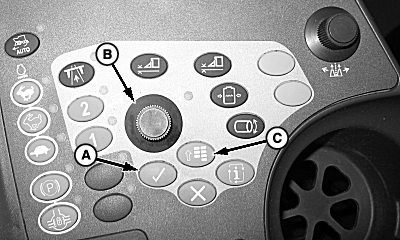
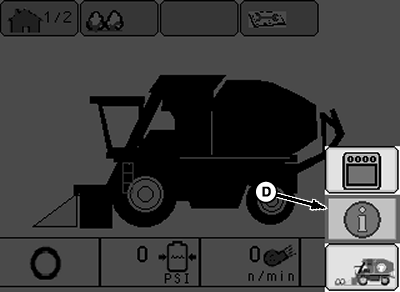
IMPORTANT: Operator presence is required to disengage the park brake. Exiting seat will cause brake to re-engage. NOTE: If the engine cannot be started to provide hydraulic means to release the park brake, or there are failures which prevent the park brake release, then mechanical means of allowing tow mode will be required. See your John Deere dealer. 1. Press the menu button (C).2. Using selection dial (B), highlight info icon (D) and press confirm button (A).
|
|
OUO1078,0000254 -19-15APR09-2/6 |
|
3.
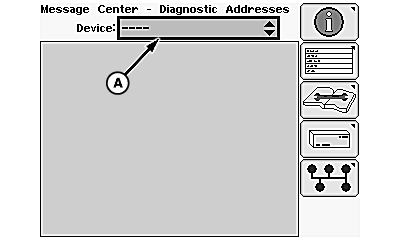
Highlight device dropdown (A) and press confirm button.
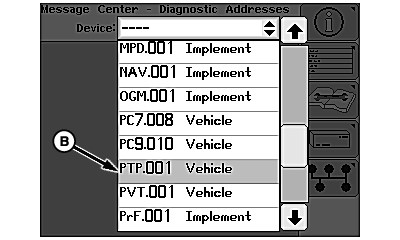
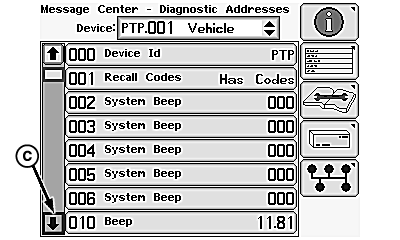
4. Scroll down and highlight "PTP.001 Vehicle" (B). Press confirm button. 5. Highlight down arrow (C) and press confirm button until "120 Input" is visible.
|
|
OUO1078,0000254 -19-15APR09-3/6 |
|
6.
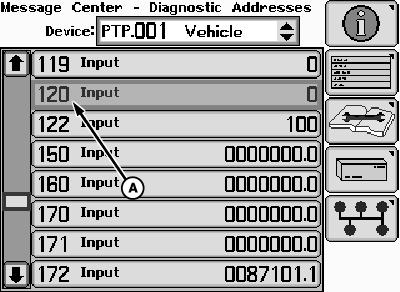
Highlight address PTP 120 Input (A) and press confirm button
|
|
OUO1078,0000254 -19-15APR09-4/6 |
|
7.
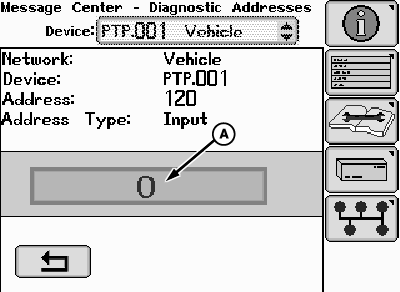
Highlight the "0" (A) and press confirm button.
|
|
OUO1078,0000254 -19-15APR09-5/6 |
|
8.
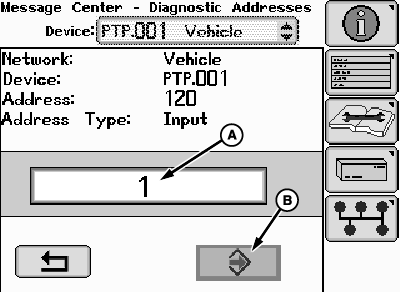
Use selection dial to change value to "1" (A) and press confirm button. Highlight the enter icon (B) and press the confirm button to save value.
9. Park brake LED will be illuminated steady indicating park brake is engaged. To disengage park brake, press the park brake button two times. The following sequence is repeated each time the button is pressed again.
10. After towing operation complete, cycling key power will return park brake to normal operation. |
|
OUO1078,0000254 -19-15APR09-6/6 |