Gain Setting Diagnostic Addresses 112 and 113
NOTE:
Changes to sensitivity can be made to account for various field conditions. A secondary adjustment is necessary to change error limits which affect "S"-ing (wandering) experienced during operation.
1.
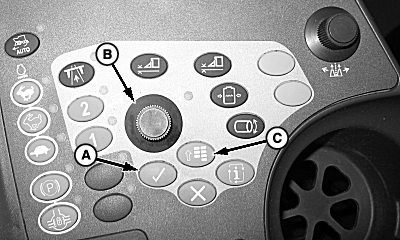
Press the menu button (C).
2.
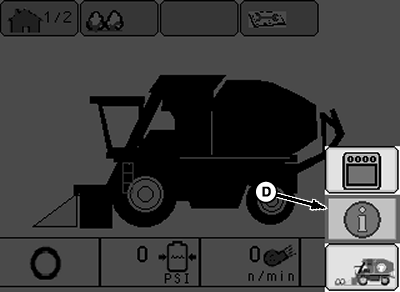
Using selection dial (B), highlight info icon (D) and press confirm button (A).
A-Confirm Button
B-Selection Dial
C-Menu Button
D-Info Icon
|
|
|
|
OUO1078,0000255 -19-15APR09-1/7
|
|
3.
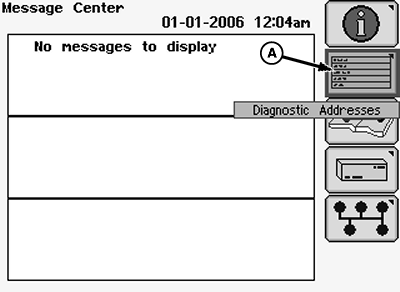
Using the selection dial, select the diagnostic addresses icon (A) and press the confirm button.
4.
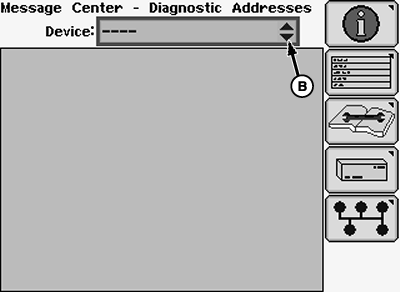
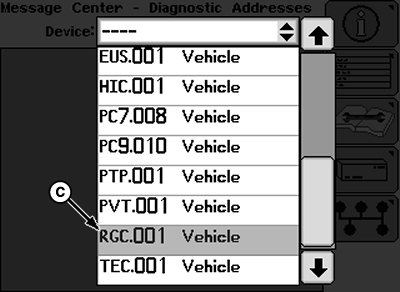
Select the drop-down menu (B) and scroll to find "RGC.001 Vehicle" (C).
5.
Select "RGC.001 Vehicle" and press the confirm button.
A-Diagnostic Addresses Icon
B-Drop-Down Menu
C-Diagnostic Address
|
|
|
|
OUO1078,0000255 -19-15APR09-2/7
|
|
6.
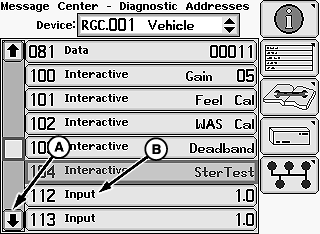
Using the selection dial, select the down scroll arrow (A) until "112 Input" (B) is found.
A-Down Scroll Arrow
B-112 Input
|
|
|
|
OUO1078,0000255 -19-15APR09-3/7
|
|
7.
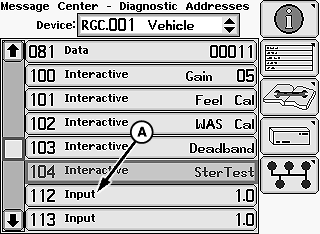
Select "112 Input" and press confirm button on armrest.
A-112 Input
|
|
|
|
OUO1078,0000255 -19-15APR09-4/7
|
|
8.
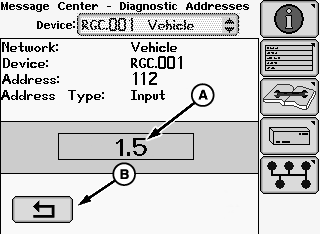
Using the selection dial, highlight response rate value (A) and press confirm button.
9.
Rotate selection dial to select value and press confirm button. Default value is 1.0 and the range is from 0-2.0. Increasing this value increases the response rate.
10.
Highlight return icon (B) and press confirm button to return to list of addresses under "RGC.001 Vehicle.
A-Response Rate Value
B-Return Icon
|
|
|
|
OUO1078,0000255 -19-15APR09-5/7
|
|
11.
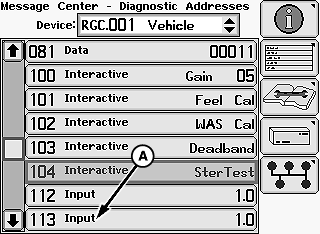
Select "113 Input" and press confirm button on armrest.
A-113 Input
|
|
|
|
OUO1078,0000255 -19-15APR09-6/7
|
|
12.
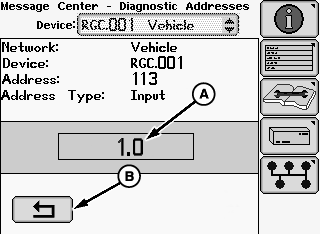
Using the selection dial, highlight error limits value (A) and press confirm button.
13.
Rotate selection dial to select value and press confirm button. Default value is 1.0 and the range is from 0-2.0. Decreasing this value reduces the "S"-ing (wandering) that is experienced.
14.
Highlight return icon (B) and press the confirm button to return to list of addresses under "RGC.001 Vehicle.
15.
Press the menu button on the armrest and select the home screen icon to return to the home screen.
|
A-Error Limits Value
B-Return Icon
|
|
|
OUO1078,0000255 -19-15APR09-7/7
|
|