Calibrate ROW-TRAK
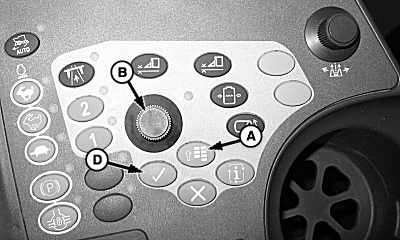
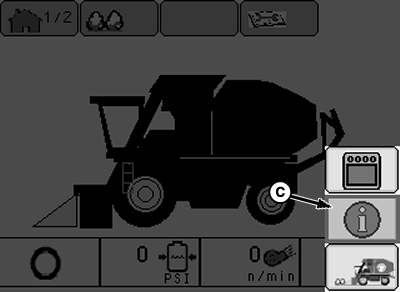
Stay clear of rear of machine while performing this check. NOTE: Machine must be in field configuration before beginning calibration procedures. 1. Locate cotton picker on a flat level surface, with available driving room. NOTE: The hydraulic system needs oil temperature to be approximately 50 °C (120 °F). 2. Start engine and let idle until oil temperature is approximately 50 °C (120 °F). 3. Press the menu button (A) and select the info icon (C) using display dial (B). 4. Press the enter button (D) to enter the info screen. |
|
 CAUTION:
Avoid injury or death to you or others caused by sudden movement in rear guide wheels.
CAUTION:
Avoid injury or death to you or others caused by sudden movement in rear guide wheels.
OUO1078,0000258 -19-18MAR09-1/9 |
|
5.
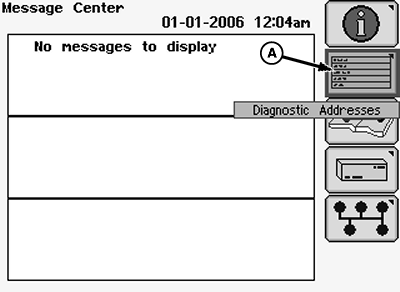
Using the display dial, select the diagnostic addresses icon (A) and press the enter button.
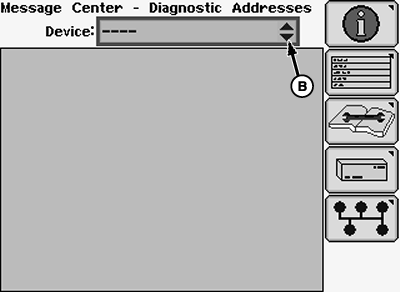
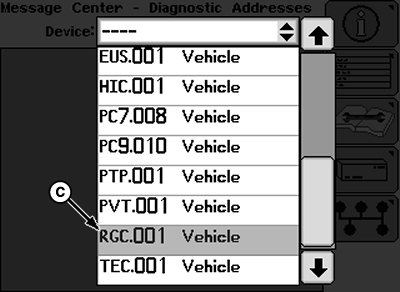
6. Select the drop-down menu (B) and scroll to find "RGC.001 Vehicle" (A). 7. Select "RGC.001 Vehicle" and press the enter button.
|
|
OUO1078,0000258 -19-18MAR09-2/9 |
|
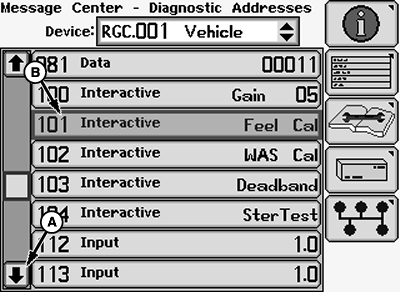
Make sure row units are NOT enabled. Disable row unit switch on armrest. NOTE: A second technician is needed to calibrate the row unit feelers. 8. Perform row unit feeler calibration: a. Using the display dial, select the down scroll arrow (A) until "101 Interactive Feel Cal" (B) is found. b. Select "101 Interactive Feel Cal" and press enter on the armrest. |
|
OUO1078,0000258 -19-18MAR09-3/9 |
|
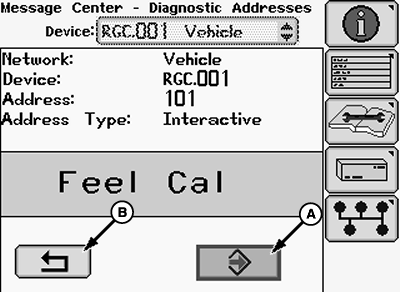
c. Highlight (A) and press enter to begin calibration. d. Follow on screen instructions. e. Have a second technician move feeler, on row unit 4, during calibration. NOTE: On machines with VRS row units, feeler is located on row unit 1. f. When instructed, move feeler completely left. Press next. g. When instructed, move feeler completely right. Press next. h. When instructed, move feeler to center. Press next. i. Once calibration is complete, "DONE" will be displayed on the Armrest Display Unit (ADU). j. Highlight (A) and press enter to save calibration. k. Highlight (B) and press enter to return to the list of addresses under "RGC.001 Vehicle". |
|

OUO1078,0000258 -19-18MAR09-4/9 |
|
9.
Perform wheel angle calibration:
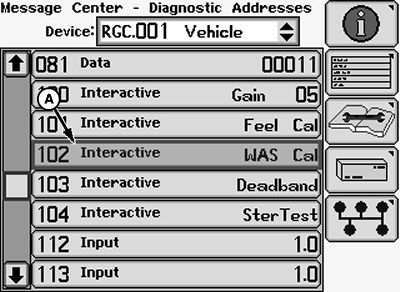
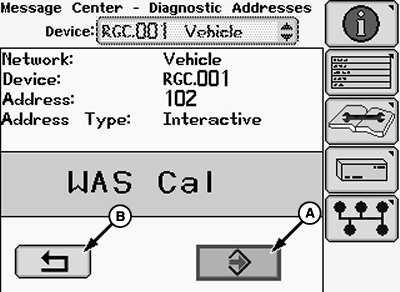
a. Using the display dial, select "102 Interactive WAS Cal" (A) and press enter on the armrest.
|
|
OUO1078,0000258 -19-18MAR09-5/9 |
|
b. Highlight (A) and press enter to begin calibration. c. Follow on screen instructions. d. When instructed, turn the steering wheel completely to the left, highlight next and press enter. e. When instructed, turn the steering wheel completely to the right, highlight next and press enter. f. When instructed, turn the steering wheel to center the rear axle. g. When instructed, drive machine forward, steering straight ahead, with ground speed greater than 1 mph (1.5 kph) until instructed to stop. h. Highlight next and press enter. i. Once calibration is complete, "DONE" will be displayed on the ADU. j. Highlight (A) and press enter to save calibration. k. Highlight (B) and press enter to return to the list of addresses under "RGC.001 Vehicle". |
|
OUO1078,0000258 -19-18MAR09-6/9 |
|
10.
Perform deadband calibration:
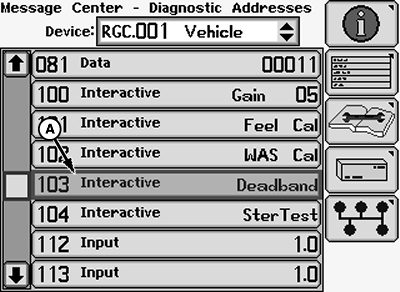
a. Using the display dial, select "103 Interactive Deadband" (A) and press enter on the armrest. b. Engage fan switch and row units switch. c. Set engine to high engine speed.
|
|
OUO1078,0000258 -19-18MAR09-7/9 |
|
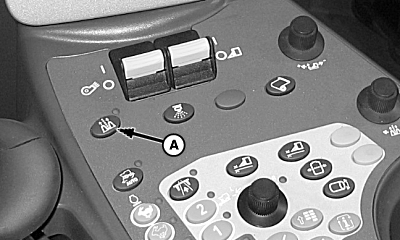
d. Press button (A) to enable Row-Trak ™ .
|
|
|
Row-Trak is a trademark of Deere & Company | OUO1078,0000258 -19-18MAR09-8/9 |
|
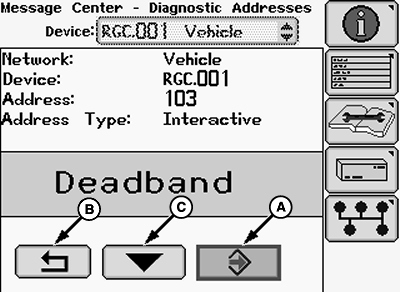
e. Highlight (A) and press enter to begin calibration. f. When instructed, drive machine forward with ground speed greater than 1 mph (1.5 kph) until instructed to stop. g. During this calibration the machine will automatically turn the rear axle. Do not touch steering wheel. Cal values will be displayed on ADU. h. Highlight next icon (C) and press enter button. i. Once calibration is complete, "DONE" will be displayed on the ADU. j. Highlight (A) and press enter button. k. Highlight return icon (B) and press enter to return to list of addresses under "RGC.001 Vehicle. 11. Press the menu button on the armrest and select the home screen icon to return to the home screen. 12. If more calibrations will be done select "keep diagnostics running," if not select "close diagnostics." |
|
OUO1078,0000258 -19-18MAR09-9/9 |