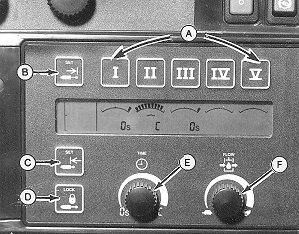
Understanding TOUCHSET Depth Control On John Deere 8000/9000/8020/9020 Series Tractors SCV TOUCHSET Controls and MonitorHydraulic setup and adjustment panel on side console provides operational display of SCV function and a means to set flow rate and detent time operation for each SCV (A). At start up, display will show all SCV numbers and symbols for 2 seconds. After start up, SCV monitor will display selected flow and time for each SCV. When 9-pin connector from implement is plugged to tractor, letter "P" will be displayed on touch set monitor for SCV I. depth of implement is set for SCV I using cylinder retract limit button (C). When SCV I control is pushed forward to detent position, implement will lower at speed selected by flow rate knob (F) to set position. Raise height of implement is set for SCV I using cylinder extend limit button (B). When SCV I control is pulled back to detent position implement will raise at speed selected by flow rate knob (F) to set position. To raise machine past upper set limit to full transport or to replace depth control hydraulic cylinders, hold SCV I control in rearward, but not to detent position. In adjustment mode, selected SCV settings may be changed. Adjustment mode remains activated for 20 seconds after which time display returns to normal operation. In normal mode, SCV monitor will only display current flow and detent time settings for each SCV. |
|
KB78086,000049F -19-20MAR08-1/3 |
|
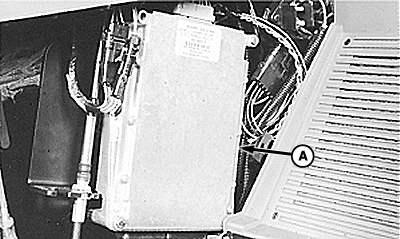
TOUCHSET Depth Control settings are being recorded by tractor's hitch control unit (HCU) (A). HCU is an electronic micro-processor which controls tractor's pressure and return solenoid valves, to raise or lower machine. HCU commands to solenoid valves depend on input signals received from operator's controls and machine sensing potentiometer. HCU compares potentiometer signal to pre-set limits and activates hydraulic system accordingly. When potentiometer signal and pre-set limits match, hydraulic system is deactivated by HCU. |
|
KB78086,000049F -19-20MAR08-2/3 |
|
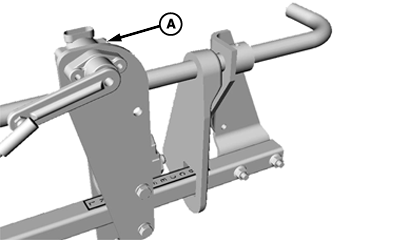
Machine sensing potentiometer (A) sends an electronic signal to HCU in same way hitch position sensor does when using HCU for hitch control. As rockshaft moves, linkage rotates potentiometer shaft which changes resistance value of potentiometer and voltage signal seen at HCU.
|
|
KB78086,000049F -19-20MAR08-3/3 |