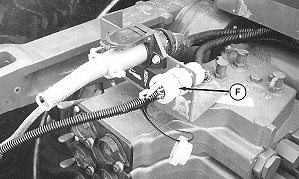
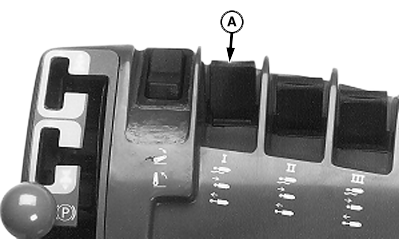
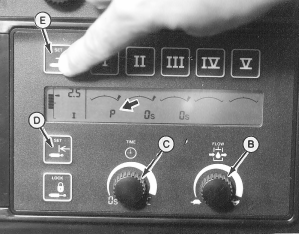
Adjusting and Operating TOUCHSET Depth Control for John Deere 8000/9000/8020/9020 Series TractorsTOUCHSET Depth Control is an attachment that allows all depth control settings and depth changes to be made from convenience of tractor cab for John Deere 8000/9000/8020/9020 Series Tractors. Single Point Depth Control and TOUCHSET Depth Control are attached to machine at same time, be sure Single Point Depth Control does not interfere with TOUCHSET Depth Control operation. When 9-pin plug (F) is plugged in, letter "P" (see arrow in photo below) will be displayed on touch set monitor for SCV I. NOTE: Detent time adjustment knob (C) for SCV I switch does not function in TOUCHSET Depth Control mode. Set flow control knob (B) to rabbit or fast position. Set detent time adjustment knob (C) at 3-6. It can be adjusted faster or slower as needed. Set depth by pushing SCV I switch (A) forward to lower machine to desired working depth, and then push lower set button (D). To set upper raise limit, pull back on SCV I switch (A) until reaching desired upper raise position. Push upper limit button (E).
|
|
NXH8,M63730,AF -19-25JAN08-1/1 |