Adjusting Disk Scrapers
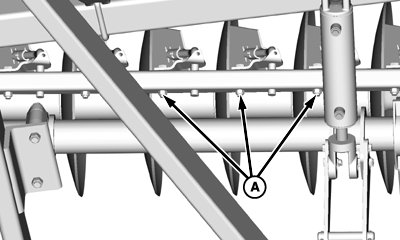
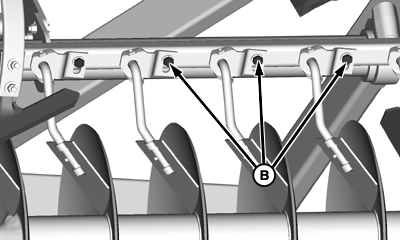
Machines are shipped with scrapers set in rigid position for longer life. Use scrapers in rigid position for most soil conditions, especially highly abrasive soil. RIGID OPERATION-Hold scraper in a fixed position by tightening attaching and lock nuts (A) cap screws (B). SELF-ADJUSTING OPERATION-For scraper break-in, positioning scrapers for self-adjusting operation will allow scraper blades to form to shape of disk blades during first 10-20 hours of machine operation. After this break-in period, reset scrapers to rigid operation to prevent excessive wear of scraper blades. IMPORTANT: Use spring-loaded feature when running machine over rolling or terraced terrain to prevent machine damage. To set self-adjust, loosen lock nut (A) several turns to allow spring tension to hold scraper against disk blade. Use spring-loaded feature in sticky soil conditions to keep scraper against disk blade. |
|
 CAUTION:
Self-adjusting scrapers are sharp and spring loaded and can cause serious injury to your or others. Wear protective gloves to help prevent injury from cutting edges of disk blades or scraper blades.
CAUTION:
Self-adjusting scrapers are sharp and spring loaded and can cause serious injury to your or others. Wear protective gloves to help prevent injury from cutting edges of disk blades or scraper blades.
OUO6061,00022C9 -19-21APR08-1/1 |