Set Tread Width—With Hydraulic Tread Adjust Option
NOTE: Wheels can be adjusted to any wheel spacing between 2286 mm (90 in.) and 3048 mm (120 in.)
First or second speed range must be selected for tread adjust to work.
If sticking occurs, remove debris from axle knees and spray with TY25733 teflon based lubricant. Activate tread adjust in and out until free.
IMPORTANT: Machine damage can occur to suspension and wheel assembly if tread width is adjusted when machine is stopped or when machine is moving over 3 km/h (2 mph).
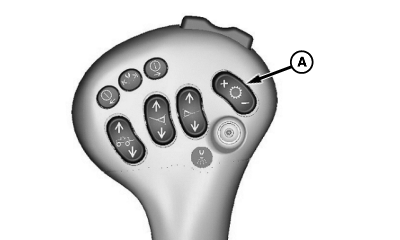
N67784-UN-24SEP04A - Speed Range Switch
Start machine. Using speed range switch (A), shift machine into first speed range and drive forward slowly.NOTE: If machine is not equipped with hydraulic tread adjust, switches will be inoperative.
Both wheels on either side of machine may be adjusted at the same time if desired.
When adjusting wheel tread spacing, use decals (D) at front and rear of machine. When desired wheel tread setting is above the axle collar (E) stop machine and verify wheel tread setting.
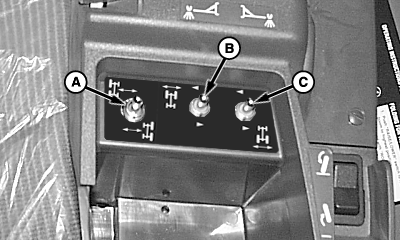
N80056-UN-26FEB08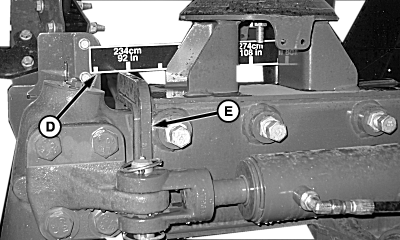
N84403-UN-24APR09Right Rear Shown
A - Switch, “Left”/”Right”
B - Switch, “Front”
C - Switch, “Rear”
D - Decal
E - Collar
Adjust wheel spacings using switches located under armrest pad behind multifunction control handle.Adjust left-hand front wheel or right-hand front wheel in or out by pressing and holding down appropriate side of “Left”/”Right” switch (A) and in or out “Front” switch (B) until desired setting is achieved.
Adjust left-hand rear wheel or right-hand rear wheel in or out by pressing and holding down appropriate side of “Left”/”Right” switch (A) and in or out “Rear” switch (C) until desired setting is achieved.
OUO6092,0000176-19-20090709 |