Reset Spray Calibrations to Factory Default Settings
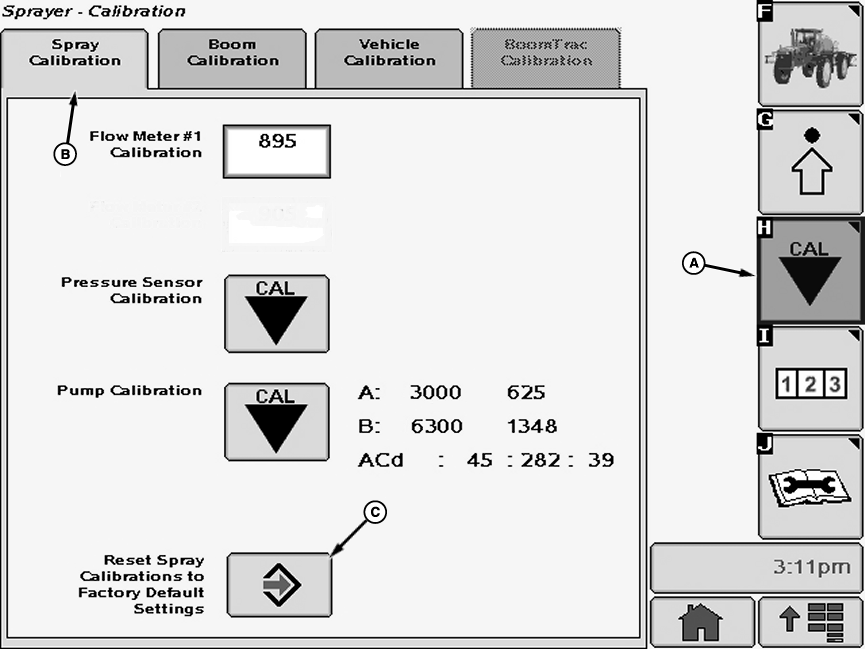
N84143-UN-08JUN09A - Calibration Softkey
B - Spray Calibration Tab
C - Enter Button
Select the Calibration softkey (A) to view the setup menu.Select the Spray Calibration tab (B).
Select “Enter” button (C) next to Reset Spray Calibrations to Factory Default Settings. Reset Spray Calibrations to Factory Default Settings screen will appear.
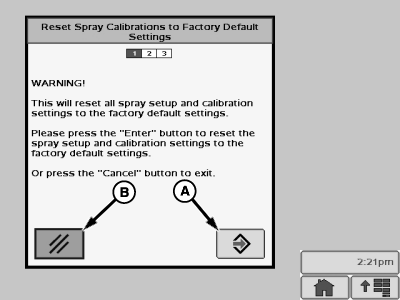
N77310-UN-15AUG07A - Enter Button
B - Cancel Button
Follow instructions on screen. When finished select “Enter” button (A) to proceed with resetting calibrations to defaults or select “Cancel” button (B) to exit.
OUO6092,00001BC-19-20090707 |