Foam Marker
N84154-UN-08APR09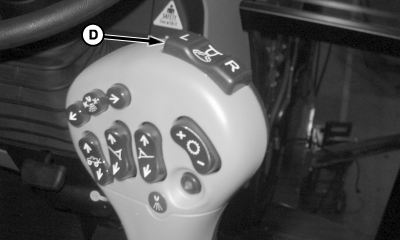
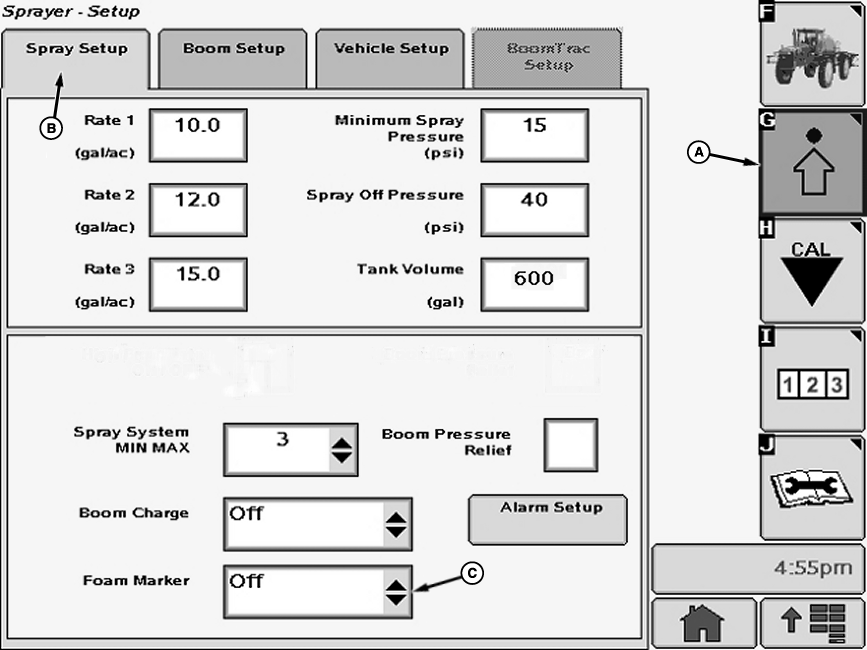
N84398-UN-24APR09A - Setup Softkey
B - Spray Setup Tab
C - Drop-Down Box
D - Foam Marker Switch
Select the Setup softkey (A) to view the setup menu.Select the Spray Setup tab (B).
Select drop-down box (C) next to “Foam Marker” and select between:
- “OFF”
- “MANUAL”
- “AUTO”
When “MANUAL ” is selected, the operator controls which side of the vehicle the marker is operating. When “AUTO” is selected, the foam marker automatically switches from one side to the other when the solution spray master ON/OFF switch is turned off and then on again, or if switch on top of multifunction control handle is pushed.
Foam marker switch (D) on multifunction control handle is a two-function switch used to select right-hand or left-hand foam markers. Foam marker system is turned off by pressing both “L” and “R” switches at same time.
OUO6092,00001C6-19-20090708 |