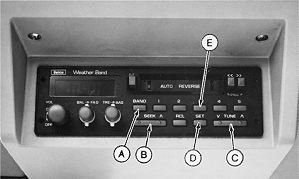
Operating Radio-Older DesignPress BAND button (A) to select desired AM, FM, or Weather Band. Press manual TUNE (C) or SEEK button (B) to locate a desired station. NOTE: SEEK button will automatically search for the next available station. Another station will be found each time the SEEK button is pressed. Press SET button (D). The station frequency will flash for 5 seconds or until a preset button is pushed. Press one of PRESET buttons (E) to establish a preset for that station. The radio will now return to that frequency each time preset button is pressed and released. NOTE: A total of fifteen stations can be preset-five AM, five FM, and five WX ( Weather Band ). |
|
AG,OUO1011,742 -19-07JUL99-1/1 |