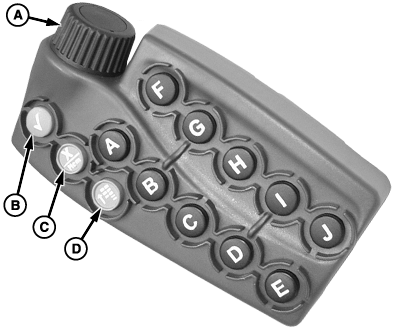
Selecting a Desired Input Field with Display Control-OptionalNOTE: The 2600 GreenStar Display's primary navigational point is the touchscreen which allows the operator to input information by touching the screen. THUMB WHEEL (A)- move highlight or focus ENTER (B)-allows operator to select input fields, buttons, or softkeys. CANCEL (C)-cancels operator's selection or exits from selection process. MENU (D)-displays menu list Short-Cut Buttons A-J-allow operator to activate an associated input field, button, or softkey with the letter corresponding to the short-cut button pressed. NOTE: Only input fields or softkeys will show a Highlight/focus around it. To activate and select an input field, move highlight/focus with thumb wheel to desired function and press ENTER button. |
|
OUO6092,0000D64 -19-01FEB07-1/1 |