Setting Number of Boom Sections, Number of Nozzles and Spacing
|
|
|
|
|
|
1.
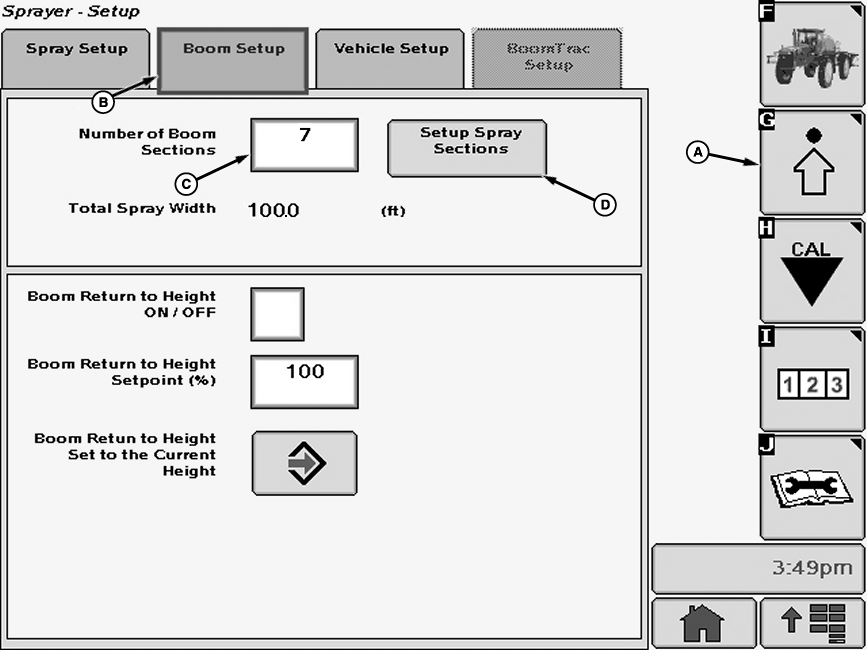
Select the Setup softkey (A) to view the setup menu.
2. Select the Boom Setup tab (B). 3. Select each input box (C) next to "Number of Boom Sections" to be changed and enter a new value |
using pop-up keyboard. Select the Enter button to accept new value.
4. Press "Setup Spray Sections" button (D). The Setup Spray Sections screen will appear. |
OUO6092,0000D78 -19-29JAN07-1/2 |
|
5.
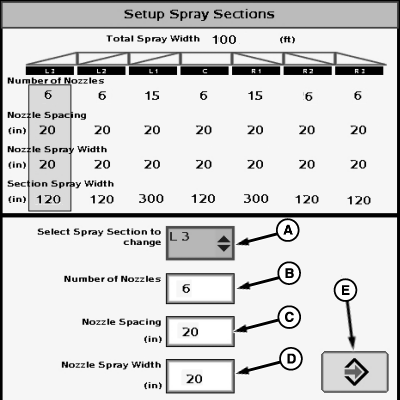
Select drop-down box (A) next to "Select Spray Section to change" and select section to change from menu.
6. Select each input box (B-D) to be changed and enter a new value using pop-up keyboard. Select the Enter button to accept new value. (Repeat for each section on boom.) NOTE: In broadcast spraying only, nozzle spray width is equal to nozzle spacing. Refer to back side of nozzle tip calculator to determine effective tip spray width. NOTE: Section spray width and total width are calculated automatically from above settings. 7. Select the enter button (E) to accept new values.
|
|
OUO6092,0000D78 -19-29JAN07-2/2 |