Setup Boom Return To Height
|
|
|
|
|
|
1.
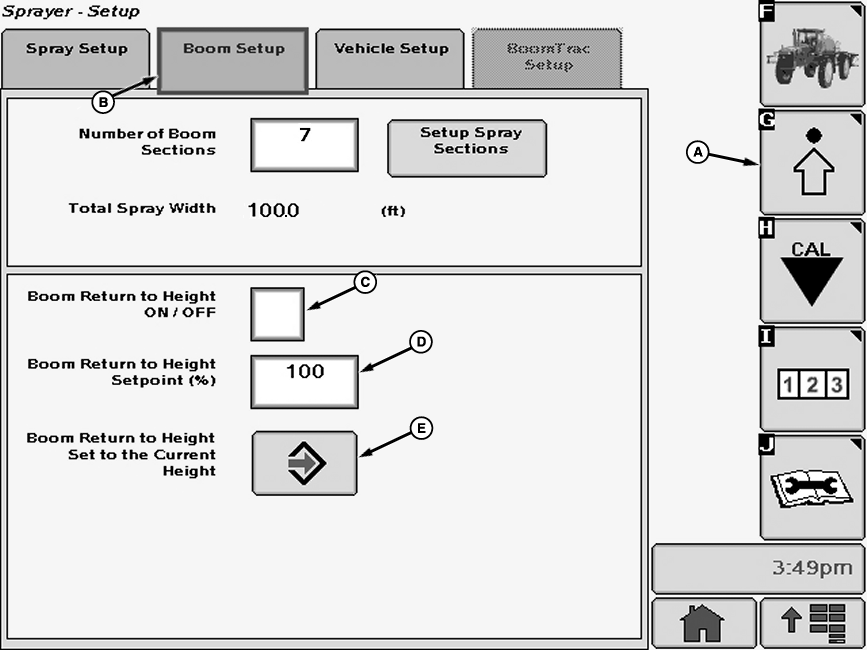
Select the Setup softkey (A) to view the setup menu.
2. Select the Boom Setup tab (B). NOTE: A check mark in the box indicates that "Boom Return to Height" is activated. 3. Select check box (C) next to "Boom Return to Height" and a check will appear inside box activating item. To deactivate a check box, touch check box to remove the check. |
NOTE: The height of boom will be expressed as a percentage of the calibrated range. If more than one height is to be used often, record the values and plug them in after "Boom Return to Height Setpoint". 4. Input box (D) shows the current set point. Select the box and enter new set point using pop-up keyboard. 5. Move boom up or down to desired height. |
OUO6092,0000D79 -19-01FEB07-1/2 |
| 6. Press "Enter" button (E) next to "Boom Return to Height Set to the Current Height" to save this value. |
OUO6092,0000D79 -19-01FEB07-2/2 |