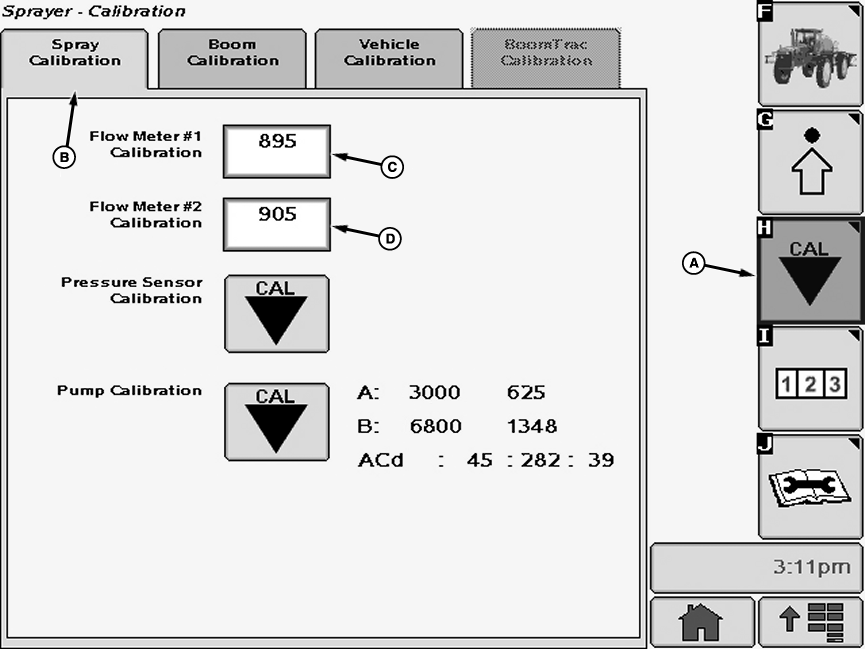
Setting Flowmeter(s) Calibration Number
|
|
|
|
|
|
NOTE: Flowmeter is not recommended for boom flow rates under 15 Lpm (4 gpm). 1. Select the Calibration softkey (A) to view the setup menu. 2. Select the Spray Calibration tab (B). 3. Select input box (C) to be changed and enter a new value using pop-up keyboard. Select the enter button to accept new value. NOTE: If optional high flow rate plumbing is to be used, a second flow meter is required. Verify |
correct calibration numbers are entered for each flowmeter by removing each flowmeter insert and checking etched number on both.
4. Select input box (D) to be changed and enter a new value using pop-up keyboard. Select the enter button to accept new value. NOTE: The flowmeter calibration number is stamped on the stainless steel tag attached to the back of the GreenStardisplay. It is also etched on the flowmeter insert. Flowmeter calibration value range is 850-950. |
OUO6092,0000D7D -19-13NOV08-1/1 |