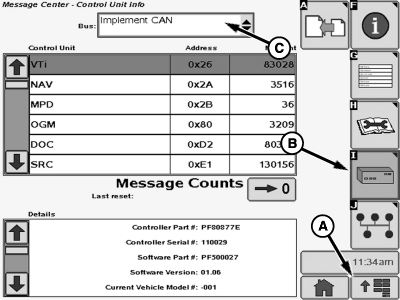
Control Unit InfoThis function is used by the factory in order to help with diagnosing the system. 1. Select Menu Button (A).2. Select Message Center Button from the application menu. 3. Select Electronic Control Unit Info Softkey (B). 4. Select Vehicle CAN from drop-down menu (C) to access CAN Bus information for the Vehicle controllers, or select Implement CAN from the drop-down menu (C) to access CAN Bus information for the Implement/AMS controllers.
|
|
OUO6092,0000DA0 -19-07MAY07-1/1 |