Sensor Placement
|
|
1.
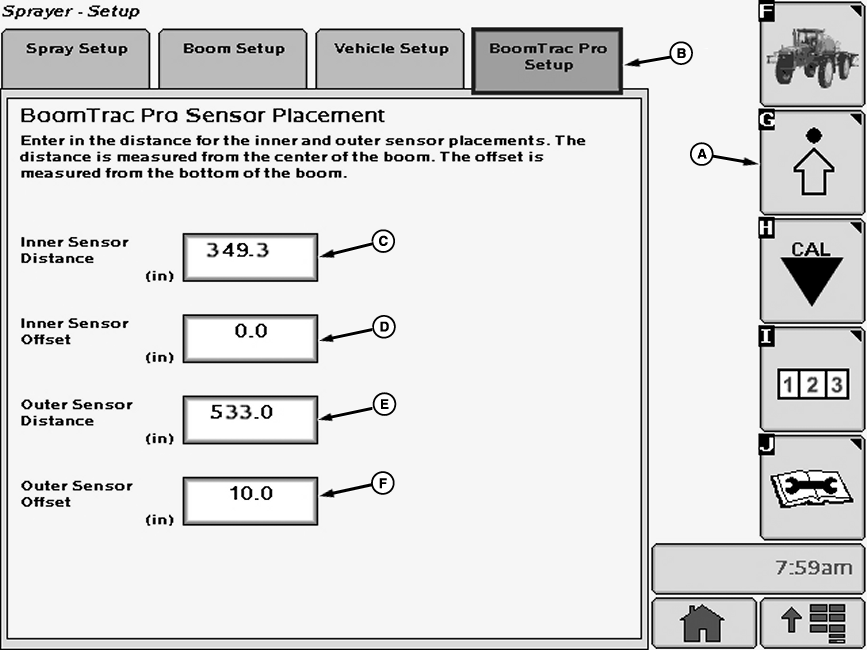
Select the Setup softkey (A).
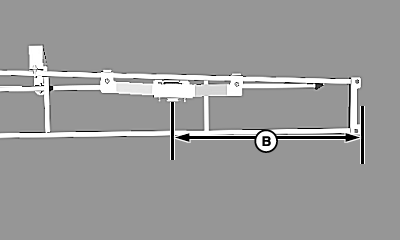
2. Select the BoomTrac Pro Setup tab (B). Follow directions on BoomTrac Pro Sensor Placement screen: Inner Sensor Distance (C)- This input box is only valid for a 5 sensor system in which the vehicle has two sensors on the inner boom section and two on the breakaway sections. The distance entered here is the distance from the center of the suspended center frame to the center of the inner boom BoomTrac Pro height sensor. The default value is the recommended placement for the location of the sensor. |
Inner Sensor Offset (D)- This is the distance vertically from the bottom of the boom to the face of the BoomTrac Pro height sensor. The offset for the inner height sensors should be zero (0) because the face of the sensor level with the bottom of the boom. Outer Sensor Distance (E)- this distance is from the center of the suspended center frame to the center of the outer boom BoomTrac Pro height sensor. Outer Sensor Offset (F)- The distance the BoomTrac Pro breakaway bracket places the height sensor from the bottom of the boom. This value should only be changed if a different bracket is used. |
OUO6092,0000EFA -19-11NOV08-1/2 |
|
|
|
||||||||||||||||||||||||||||||||

OUO6092,0000EFA -19-11NOV08-2/2 |