Calibrate Boom Level Position
|
|
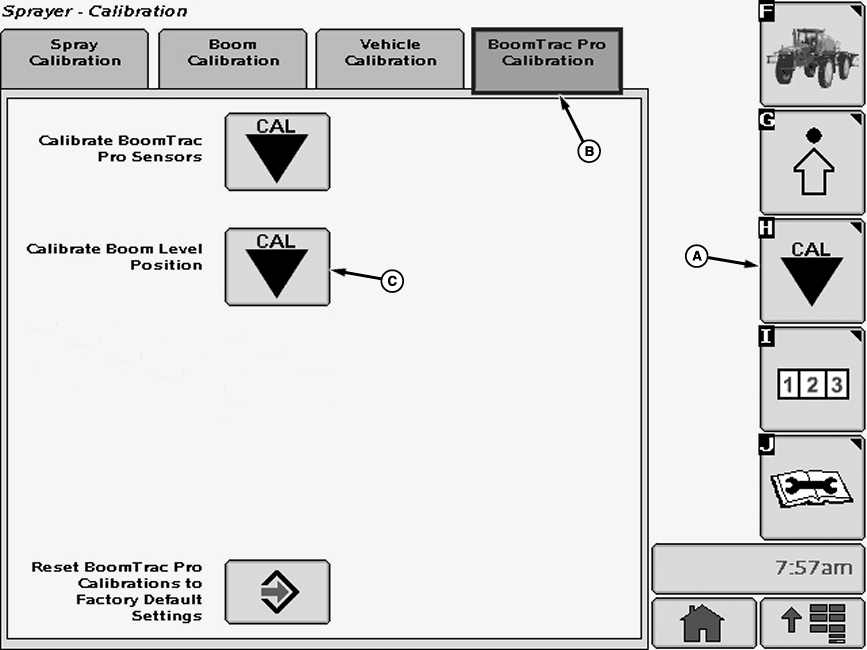
NOTE: Calibrating Boom Height Sensors should be done before any other changes or calibrations are performed. 1. Select the Calibration softkey (A). |
2. Select the BoomTrac Pro Calibration tab (B). 3. Select calibration icon (C) next to Calibrate Boom Level Position. Calibrate Boom Level Position screen will appear. |
OUO6092,0000FD2 -19-13AUG07-1/2 |
|
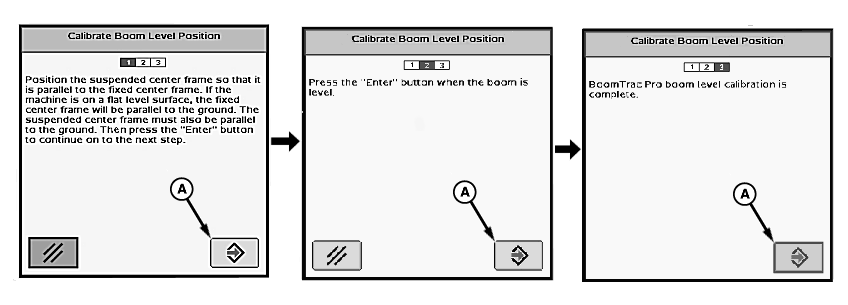
| 4. Follow instructions on first screen. When finished select "Enter" button (A) to proceed to next screen. |
5. "BoomTrac Pro boom level calibration is complete." will be displayed. |
OUO6092,0000FD2 -19-13AUG07-2/2 |