Enabling Boom Pressure Relief
|
|
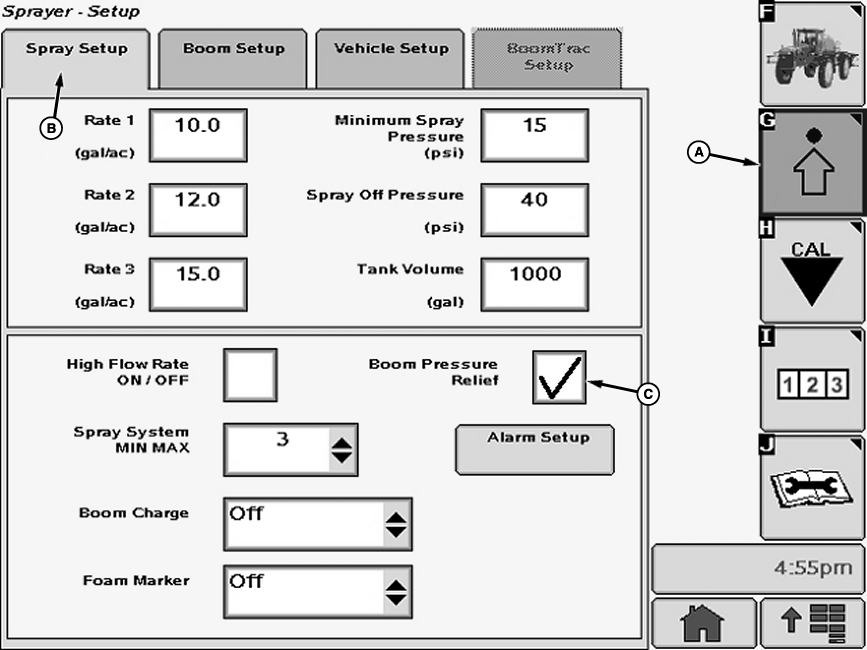
1. Select the Setup softkey (A) to view the setup menu. |
2. Select the Spray Setup tab (B). NOTE: A check mark in the box indicates that "Boom Pressure Relief" is activated. 3. Select check box (C) next to "Boom Pressure Relief" and a check will appear inside box activating item. To deactivate a check box, touch check box to remove the check. |
 CAUTION:
Avoid unintended spray from nozzles. Do not use when non-John Deere after-market solution system equipment is installed. These include but are not limited to, direct injection and section ON/OFF control systems.
CAUTION:
Avoid unintended spray from nozzles. Do not use when non-John Deere after-market solution system equipment is installed. These include but are not limited to, direct injection and section ON/OFF control systems.
OUO6092,0000FD5 -19-13AUG07-1/1 |