Setting Time and Date
|
|
|
|
|
|
1.
Select Menu button.
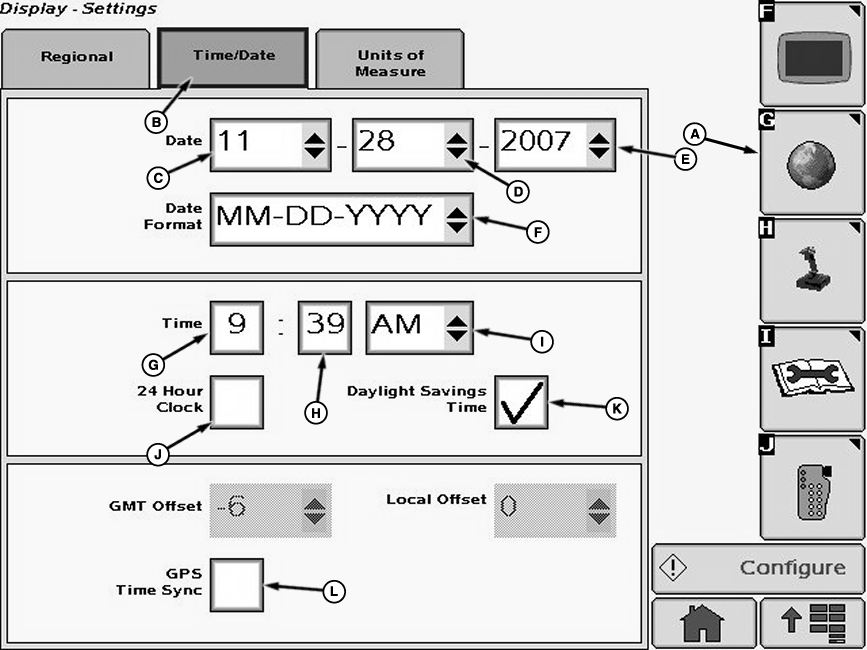
2. Select Display button. 3. Select Settings softkey (A). 4. Select Time/Date tab (B). NOTE: If GPS Time Sync box (L) is checked, the date and time formats are updated automatically. Uncheck the box to update manually. |
5. Select the month (C), day (D), and year (E) from drop-down menus. 6. Select date format from drop-down box (F). 7. Select input boxes (G and H) to input hour and minute figures. 8. Select AM or PM from drop-down box (I). |
OUO6092,000108B -19-21FEB08-1/2 |
| 9. Select check box (J) for 24 hour clock option and a check will appear inside box activating item. To deactivate a check box, touch check box to remove the check. |
10. Select check box (K) for daylight savings option and a check will appear inside box activating item. To deactivate a check box, touch check box to remove the check. |
OUO6092,000108B -19-21FEB08-2/2 |