BoomTrac Pro Setup Page
|
|
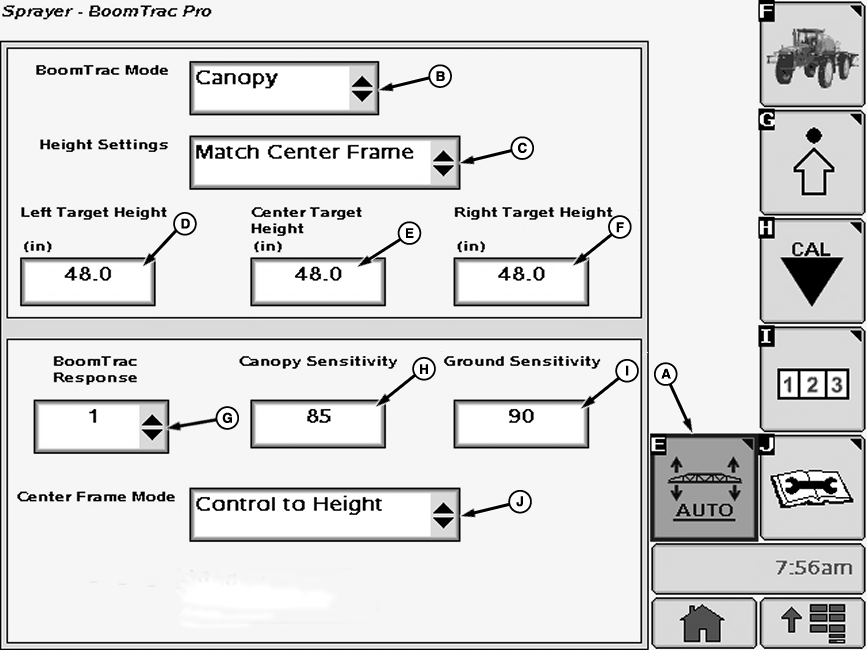
Select the Setup softkey (A) or press BoomTrac button on Sprayer Main Page to access page. On BoomTrac Pro Page the following are displayed and can be changed: BoomTrac Mode (B)- This section allows the user to select between "Canopy" and "Ground" modes of operation. "Canopy" mode causes the boom height sensors to react to the first thing it sees looking vertically to the ground. This mode can be used to maintain a boom height relative to the top of the crop canopy or to the ground if no crop exists. |
"Ground" mode causes the boom height sensors to look past the first obstacle it sees looking vertically to the ground. This mode can be used to maintain the boom height relative to the ground when there is crop present in the field. It is important to note that in dense crop conditions, the boom height sensors may not be able to see the ground. In this case, it is better to run in canopy mode and maintain some distance between the booms and the top of the crop canopy. Height Settings (C)- This section allows the user to select between "Match Center Frame" and "Individual" modes of operation. |
OUO6092,00011CF -19-31MAR08-1/2 |
|
"Match Center Frame" mode will match the left (D) and right (F) target heights to the center frame target height (E). In this mode, the center frame height (48) is highlighted. This is the only height the user can modify when operating in this mode. When in "Match Center Frame" mode the operator can raise or lower the center frame height using button located on the multifunction control handle. Then by pressing and releasing the resume button the center frame will return to the previously set height or the operator can press and hold the resume button for 3 seconds to save the new height as the set height. "Individual" mode allows the user to individually change the target height of each boom section (i.e. left boom (D), right boom (F), and center frame (E)). NOTE: The target heights here are the distance from the bottom of the boom to the target (ex. crop canopy, ground, etc.). BoomTrac Response (G)- Allows the operator to set the response of BoomTrac Pro from 1 through 10. The higher the response setting, the quicker BoomTrac Pro reacts to changes in contours. Canopy Sensitivity (H)- Allows the operator to set the sensitivity of the boom height sensors. This number can be set anywhere from 0% to 100%. The larger the number, the wider the view of the sensor. The default value for this setting is 100%. This setting will take effect when the operator is running in "Canopy" mode. |
Ground Sensitivity (I)- Allows the operator to set the sensitivity of the boom height sensors. This number can be set anywhere from 0% to 100%. The larger the number, the wider the view of the sensor. The default value for this setting is 100%. This setting will take effect when the operator is running in "Ground" mode. Center Frame Mode (J)- There are three options the operator can choose from drop down menu, "Control to Height", "Return to Height", and "Manual". "Control to Height" mode will adjust the center frame to the set target height when the resume switch is pressed. This option must be selected in order for BoomTrac Pro to control the center frame. The center frame will only adjust to the target height once. It will not be actively controlled after the initial button press. If the operator wants to adjust the center frame again, they must press the resume switch again. "Return to Height" mode works in the same way as the current return to height feature on the machine. The difference is that this option uses the BoomTrac Pro height sensors to set the return height. In this mode, the center frame will never actively move. "Manual" mode allows the operator to use the return to height feature already available on the machine. It does not use the BoomTrac Pro height sensor to set the return height. In this mode the center frame will never actively move. |
OUO6092,00011CF -19-31MAR08-2/2 |