Adjusting Lower Feeder Belt Tension and Checking Tracking
IMPORTANT: Module Builder must be in lowered transport position before attempting belt maintenance procedures.
Recommended Service Interval | |
|---|---|
Adjust Belt Tension and Check Tracking. Adjust Tracking As Necessary. | Every 100 Hours |
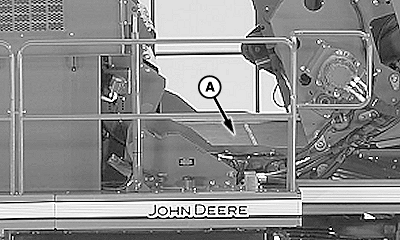
N75297-UN-02APR07
A - Lower Feeder Belt
NOTE: Two people are needed to perform this procedure properly.
Adjust lower feeder belt (A) tension and check tracking as follows:
Park machine on level surface.
Place machine in transport mode and lower module builder into transport position. (See POSITIONING MACHINE FOR TRANSPORT in Operating the Machine section.)
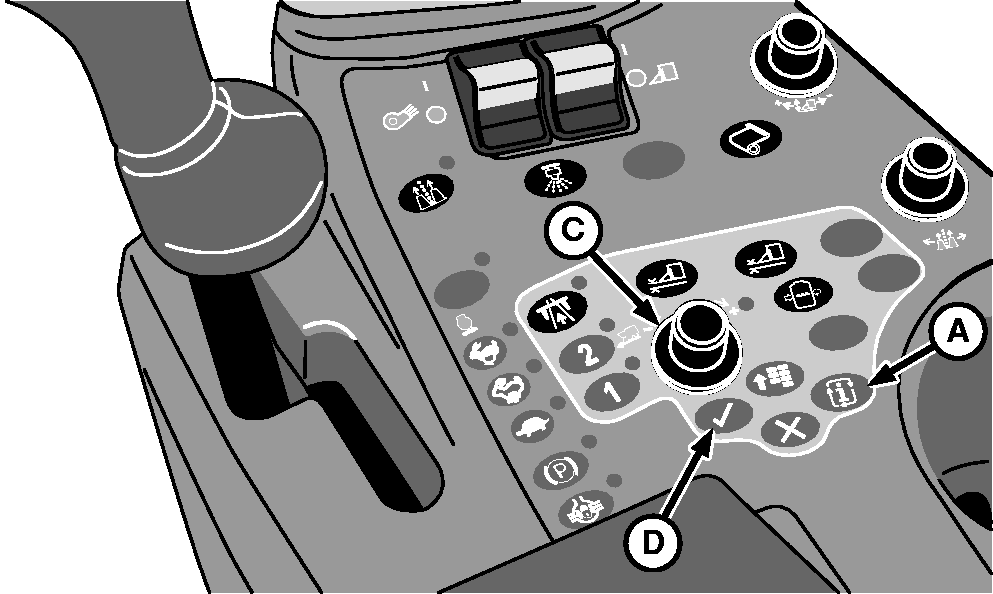
N87838-UN-26FEB10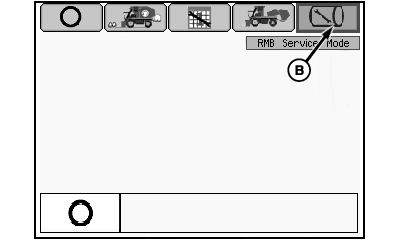
N87843-UN-02MAR10Mode Management Screen
N88338-UN-08APR10RMB Service Mode Selection Screen
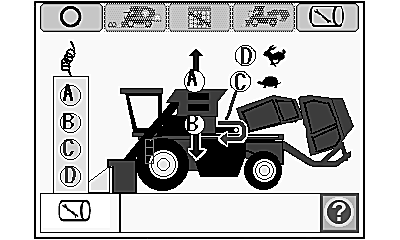
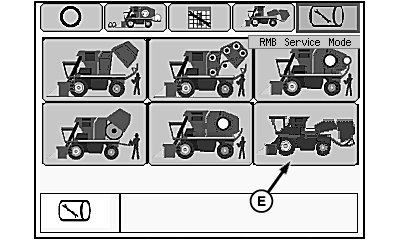
N88040-UN-02MAR10Feeder Belt Service Mode Functional Diagram
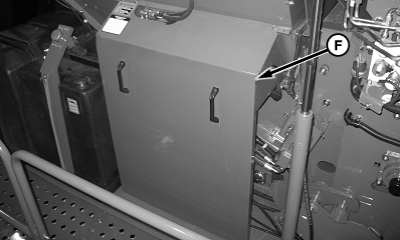
N88521-UN-04MAY10Access Panel
A - Mode Select Button
B - RMB Service Mode Icon
C - Selection Dial
D - Confirm Button
E - Feeder Belt Service Mode Icon
F - Access Panel
Press mode select button (A) on control console to display mode management screen on armrest display unit (ADU).Highlight RMB service mode icon (B) using selection dial (C).
Press confirm button (D). RMB service mode selection screen appears on ADU.
Rotate selection dial to highlight feeder belt service mode icon (E).
Press confirm button to activate service mode. Feeder belt service mode functional diagram appears on ADU.
Press button A on tether control unit to raise accumulator to full height.
Shut off engine and remove key.
Support accumulator in raised position with appropriate device.
Open door on hydraulics module and remove control unit and tether.
Remove access panel (F).
IMPORTANT: Feeder belt tension is controlled by position of tensioning roll (C) at front of feeder. Rear drive roll position is set at factory and must not be used to adjust belt tension. DO NOT adjust position of rear drive roll.
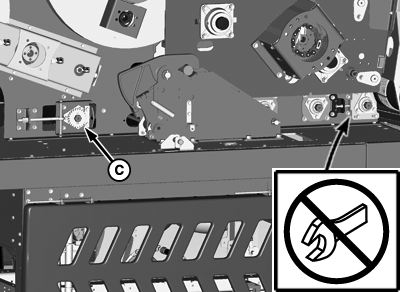
N88339-UN-03MAY10Do Not Adjust Rear Drive Roll
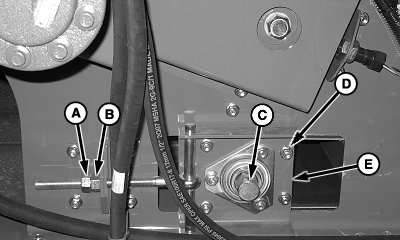
N83806-UN-01APR10Tension Adjustment-Left Side Shown
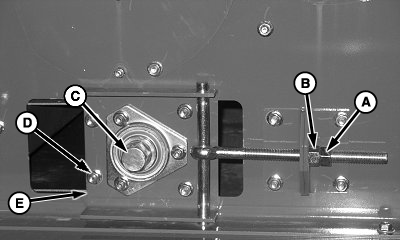
N83807-UN-01APR10Tension Adjustment-Right Side Shown
A - Jam Nut
B - Adjusting Nut
C - Tensioning Roll
D - Round Head Bolt and Nut (4 used)
E - Mounting Plate
Loosen jam nut (A) on both sides of machine.Mark position of mounting plate (E) relative to feeder side panel on each side before making any adjustments.
Loosen nuts (D) on both sides of machine.
Simultaneously loosen adjusting nut (B) on each side of feeder to relieve tension on feeder belt.
NOTE: New feeder belts are marked with indicators for use when tensioning belt. Used belts whose markings are missing must be marked before tensioning belt.
If belt is marked on both sides of machine, the following step can be skipped.
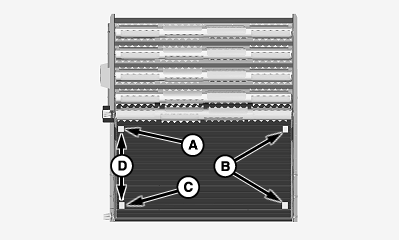
N83849-UN-19MAR09A - Location
B - Location
C - Location
D - Distance, 1270 mm (50 in.)
Using a marker or paint pen, place a mark at location (A) on left-hand edge of feeder belt. Measure distance (D) from first mark and place second mark at location (C). Repeat procedure to place marks at locations (B) on right-hand side of belt.IMPORTANT: Tighten left- and right-hand sides simultaneously to ensure that belt tracks remain in drive and tensioning roll grooves.
Distance (F) provides the required amount of belt stretch for proper tensioning. Do not overtighten.
N83806-UN-01APR10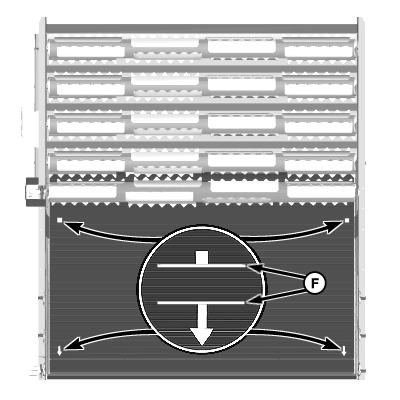
N83840-UN-18MAR09A - Jam Nut
B - Adjusting Nut
C - Tensioning Roll
D - Round Head Bolt and Nut (4 used)
E - Mounting Plate
F - Distance, 1276 mm (50.25 in.)
Tighten nut (B) on each side of machine simultaneously to apply tension to feeder belt. Tighten until distance (F) is measured between front and rear marks on each side.Make sure that mounting plate (E) is straight and round head bolts are properly seated. Tighten nuts (D).
Tighten jam nuts (A).
Start machine and wait for control units and ADU to initialize.
Navigate to feeder belt service mode as described in steps 3—7 above.
Press button C on tether control unit to operate feeder belt at slow speed for 1 minute.
Press button D on tether control and allow belt to run for 3—5 minutes at full speed to seat.
While belt is running, check tracking at drive (rear) roll. Observe position of edge of belt in relation to edge of drive roll on each side. When tracking properly, belt is centered on roll.
Adjust feeder belt tracking as necessary. (See ADJUSTING FEEDER BELT TRACKING in this section.)
Remove blocking from under accumulator. Press button B on tether control unit to lower accumulator to operating position.
Highlight transport mode icon at top of display screen and press confirm button.
Press button C on tether control unit to return machine to harvest configuration.
Select harvest mode icon on display screen and press confirm button to enter harvest mode.
Move fan switch and row units switch to ON position.
Press high engine speed button.
Press and hold floor switch for 2 minutes to engage and run cotton handling system.
Check feeder belt tracking and repeat adjustment as needed.
DP99999,0000576-19-20100504 |