Calibrate Boom Heights Sensors
NOTE: To calibrate BTP Sensors, document the physical location of each sensors and its corresponding serial number located on the bottom of the sensor. The location for left / right is as when the operator is sitting in the seat with R1 and L1 being sensors located closest to the centerline of the machine as compared to R2 and L2.
NOTE: Calibrating Boom Height Sensors should be done before any other changes or calibrations are performed.
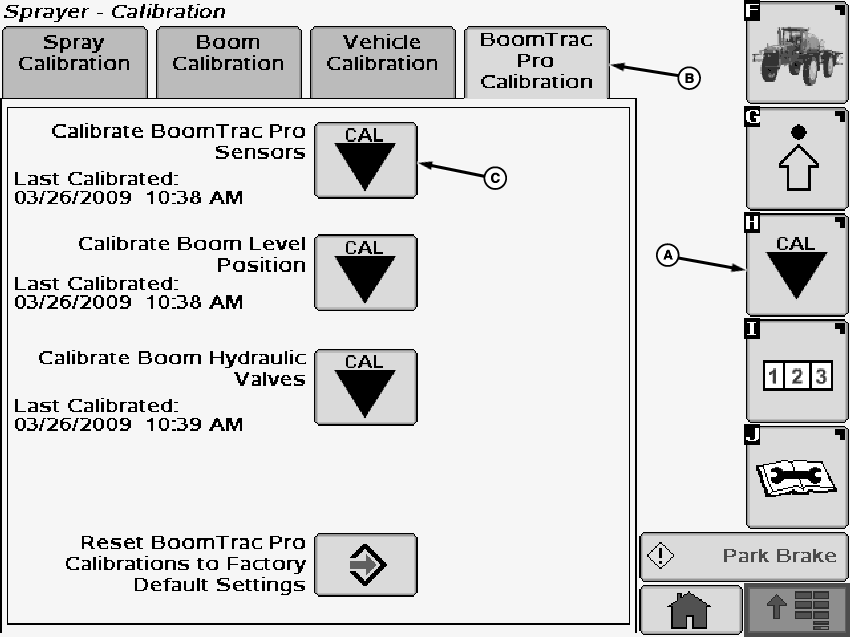
N83826-UN-31MAR09A - Calibration Softkey
B - BoomTrac Pro Calibration Tab
C - Calibration Icon
Select the Calibration softkey (A) to view the setup menu.Select the BoomTrac Pro Calibration tab (B).
Select calibration icon (C) next to Calibrate BoomTrac Pro Sensors. Calibrate BoomTrac Pro Sensors screen will appear.
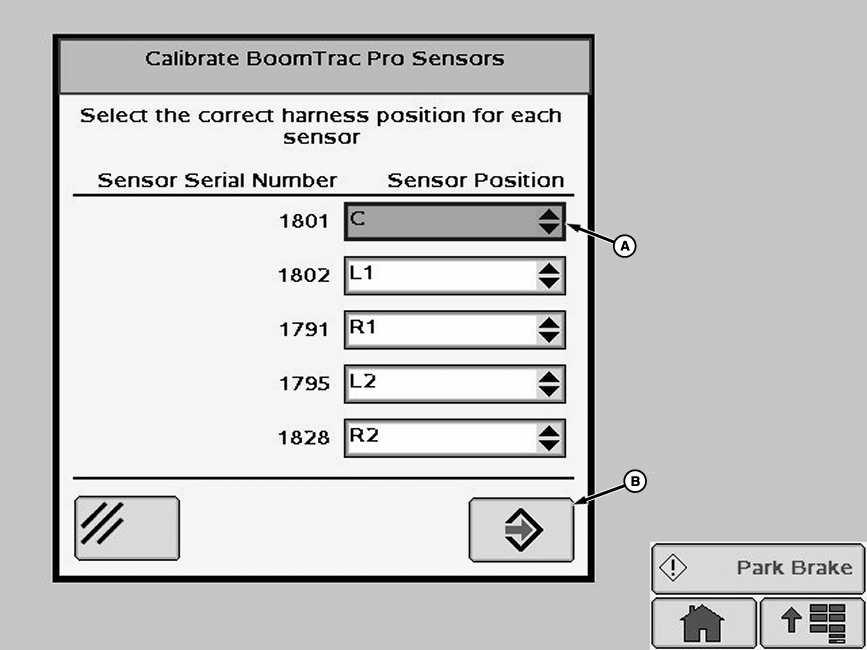
N77070-UN-10AUG07A - Drop-Down Box
B - Enter Button
The serial number of all of the sensors that were installed will be displayed. Select drop-down box (A) next to each serial number displayed and select correct position where that sensor is mounted. When correct position for each serial number is selected press “Enter” button (B). Operator will receive a message that “Calibration Was Successful”.
OUO6092,00001AD-19-20090402 |