Auto Valve Calibration
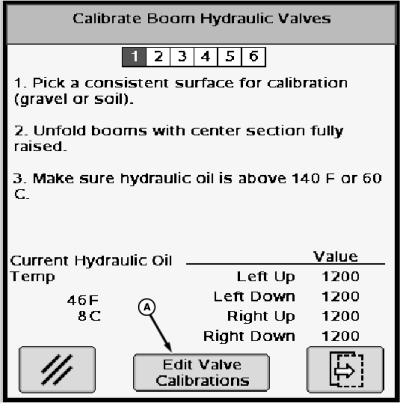
NOTE: This calibration should be performed with hydraulic oil temperature at or above 60°C (140°F).
The valve calibration should be performed over a level surface with a constant height. It’s best to run the calibration on something like dirt, gravel, or grass that is cut at the same height. The calibration will not work if it’s done in tall grass, especially when the wind is blowing.
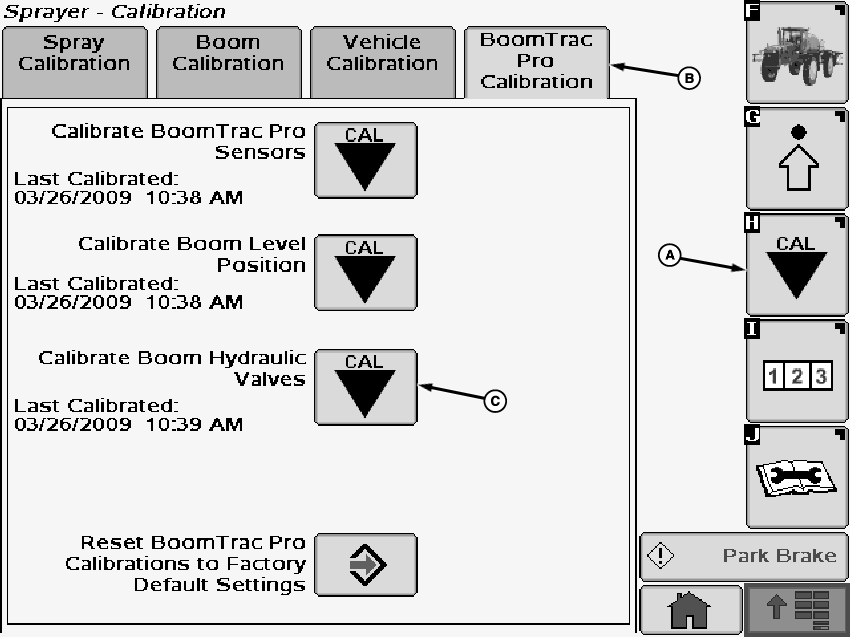
N83828-UN-31MAR09A - Calibration Softkey
B - BoomTrac Pro Calibration Tab
C - Calibration Icon
Select the Calibration softkey (A) to view the setup menu.Select the BoomTrac Pro Calibration tab (B).
Select calibration icon (C) next to Calibrate Boom Hydraulic Valves. Calibrate Boom Hydraulic Valves screen will appear.
N83829-UN-31MAR09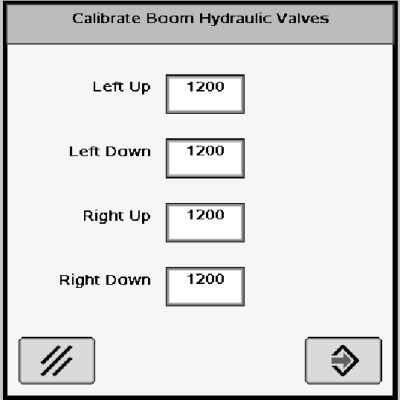
N83830-UN-31MAR09A - Button
Follow instructions on screen.NOTE: The values shown in this example (1200) will be different for each section. The value listed is the minimum modulation required to open the tilt valve and provide motion to the booms. The operator can also reset these values by pressing the “Reset to Defaults” button on the BoomTrac Pro Calibration tab page. This will return the values to 1,200.
Selecting “Edit Valve Calibrations” button to go to a screen that allows manually changing the calibration values that are stored by the automatic valve calibration.
NOTE: These values should be changed with caution as performance can be adversely affected. Entering too high a value can cause rough movement. The operator can also reset these values by pressing the “Reset to Defaults” button on the BoomTrac Pro Calibration tab page. This will return the values to 1,200.
OUO6092,00001B0-19-20090402 |