Setting Minimum Pressure

N74387-UN-12JAN07
N74389-UN-12JAN07
N83259-UN-10FEB09
A - Setup Softkey
B - Spray Setup Tab
C - Input Box
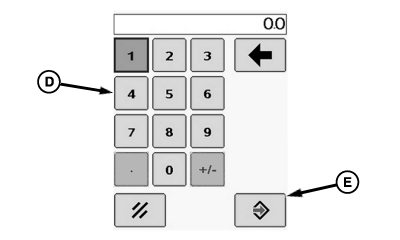
D - Pop-up Keyboard
E - Enter Button
F - Input Box
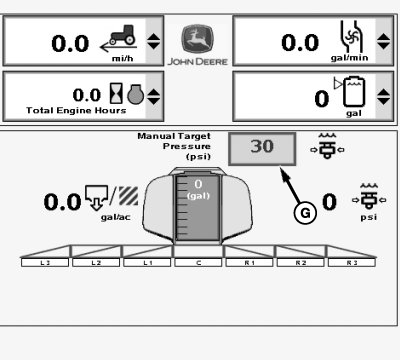
G - Manual Target Pressure Input Box
The Spray Rate Controller (SRC) will attain the minimum pressure when the master spray is ON and in auto mode.
Minimum Spray pressure is maintained when 0 kph (0 mph) ground speed is the input or below target pressure for given application rate and nozzle tip size selected.
This pressure setting needs to be higher than the nozzle check valve pressure to keep all the check valves open, but not too high to prevent over application during normal speed adjustments in the field. For example, 15 psi for the standard 12 psi check valves that are on sprayers. If minimum pressure is set too close to operating pressure, erratic operation and over-application can result.
NOTE: Viscosity of carrier may affect minimum pressure required. Perform procedure for carrier being applied. This procedure should also be reviewed whenever changing nozzle sizes, types, and or when nozzle check valves have been replaced.
Determine and set the minimum pressure required using the following procedures:
Unfold booms.
Turn all boom spray section switches on.
Select the Setup softkey (A) to view the setup menu.
Select the Spray Setup tab (B).
Select input box (C) next to “Min Spray Press. (psi)” to be changed and enter a new value using pop-up keyboard (D). Enter 0. Select the enter button (E) to accept new value.
Turn rate control switch to manual pressure setting “MAN”.
Select input box (F) next to “Spray Off Pressure (psi), to be changed and enter a new value using pop-up keyboard (D). Enter 0. Select the enter button (E) to accept new value.
Turn on solution pump and master spray switch.
Increase “Manual Target Pressure ” (G) by 6.9 kPa (.07 bar) (1 psi) increments until all nozzle body check valves open and all nozzles are spraying at full pattern. Note pressure when this occurs.
Select input box (C) next to “Min Spray Press. (psi)” to be changed and enter a new value using pop-up keyboard (D). Enter pressure from previous step. Select the enter button (E) to accept new value.
Applying At Low Pressures
When spraying at low application pressures, use check valves with lower pressure settings for optimum performance. Using nozzle bodies with higher pressure check valves than the lowest targeted application pressure when driving slow can cause nozzles to shut off and therefore cause erratic application rates.
Standard Factory Equipment
The boom has 12 psi. check valves (yellow plunger with green housing) as standard equipment. Optional check valves available through SprayMaster™ include 4, 8, 12, 20 and 25 psi settings. These pressures determine at what pressure nozzles shut off.
Optional check valve assembly size and colors:
- 4 psi (Orange Plunger)
- 8 psi (Black Plunger)
- 12 psi (Yellow Plunger)
- 20 psi (Gray Plunger)
- 25 psi (Blue Plunger)
Diaphragms:
- EPDM
- Viton, (Green Housing) — used at factory, better resistance to more chemicals.
High Flow Check Valves
Check valves available through SprayMaster™ include a standard 12 psi and an optional 15 psi setting. These pressures determine at what pressure nozzles shut off.
Check valve assembly size and colors:
- 12 psi (Yellow Plunger)
- 15 psi (Green Plunger)
SprayMaster is a trademark of Deere & Company | OUO6092,000031B-19-20100324 |