Display Secondary Navigation
PC8580-UN-17AUG05
Display Secondary Navigation
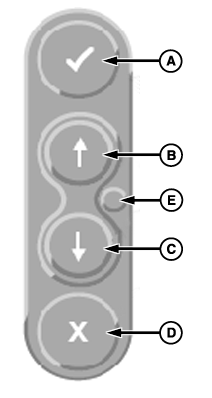
A - Enter
B - Up Arrow
C - Down Arrow
D - Cancel
E - Display Reset
Secondary display controls consist of five buttons located on backside of display. They provide backup navigation in the event that the primary display controls are not communicating with display.
ENTER button (A) and CANCEL button (D) operate the same as they do on the primary display controls.
Up Arrow (B) and Down Arrow (C) are used to tab through selections on the display.
DISPLAY RESET button (E) resets display without cycling power on vehicle. Hold for 3 seconds to reboot.
OUO6092,0000D38-19-20070201 |