Screen Layout
PC8577-UN-02NOV05
Screen Layout
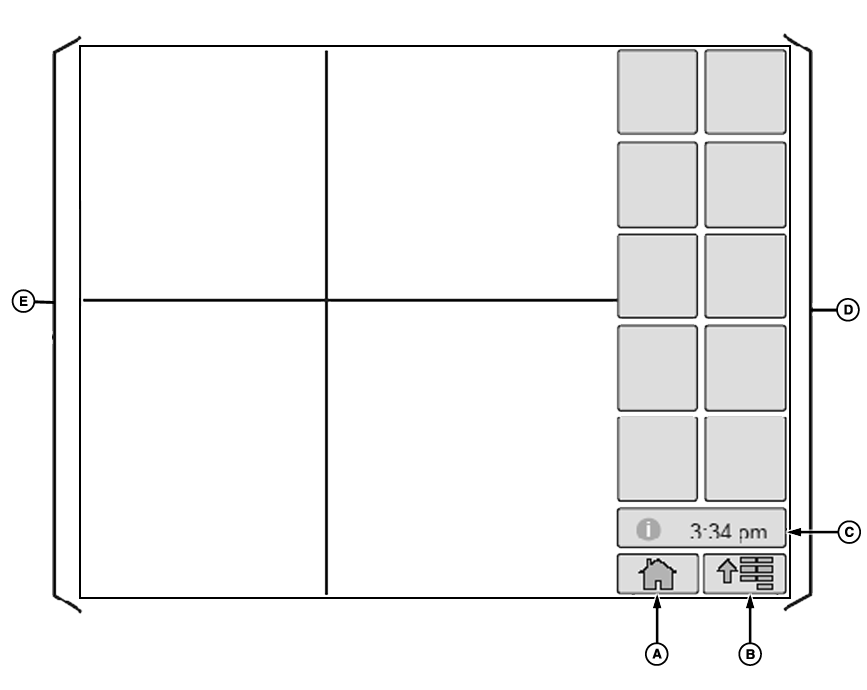
A - Home
B - Menu
C - Message Center
D - softkeys
E - Application Info Area
NOTE: Display screen illustrated on following pages are provided for reference only. Actual screens may appear differently due to connection of optional devices and/or software versions.
Home (A), Menu (B) and Message Center (C) selections will be on every screen.
- Home selection—allows operator to view Home Page.
- Menu selection—allows operator to view a list of available applications.
- Message Center selection—allows operator to view cautions, warning messages, diagnostic information. (See SETUP MESSAGE CENTER in Display Message Center section.)
Selecting one of the softkeys (D) will cause a new page to appear or a process to be started.
OUO6092,0000D3A-19-20061206 |