Refilling Tank
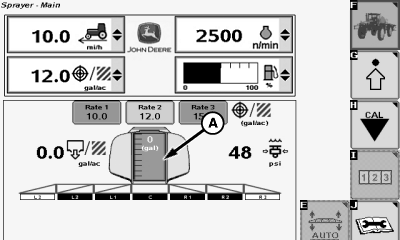
N74937-UN-31JAN07
Estimated Volume Remaining
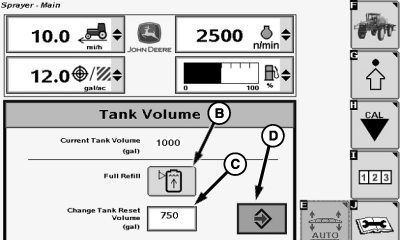
N74938-UN-31JAN07
A - Estimated Volume Remaining/Refill Button
B - Full Refill Button
C - Input Box
D - Enter Button
To reset estimated spray level after refilling:Press estimated volume remaining/refill button (A).
If volume after refilling is full, press full refill button (B). This will set the tank level to the defined tank capacity.
If the tank level after refilling is not the same as the number shown in the input box (C) next to "Change Tank Reset Volume (gal)", then you can enter a new level by selecting input box (C) next to “Change Tank Reset Volume (gal)” and entering the new level using the pop-up keyboard. This will also change the Tank Volume value from the Spray Setup page.
Press the full refill button now after changing the tank volume value to set the tank level to the new tank volume.
Select the Enter button (D) to leave the pop-up window.
OUO6092,0000D4B-19-20070201 |