Selecting a Desired Input Field with Display Control—Optional
PC8864-UN-09JAN06
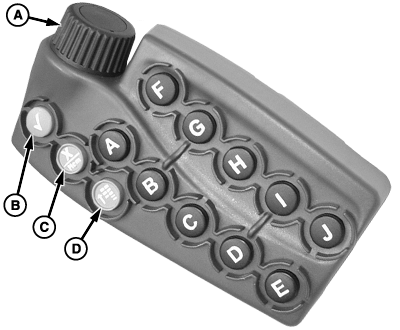
Display Control
NOTE: The 2600 GreenStar Display’s primary navigational point is the touchscreen which allows the operator to input information by touching the screen.
THUMB WHEEL (A)— move highlight or focus
ENTER (B)—allows operator to select input fields, buttons, or softkeys.
CANCEL (C)—cancels operator’s selection or exits from selection process.
MENU (D)—displays menu list
Short-Cut Buttons A-J—allow operator to activate an associated input field, button, or softkey with the letter corresponding to the short-cut button pressed.
NOTE: Only input fields or softkeys will show a Highlight/focus around it.
To activate and select an input field, move highlight/focus with thumb wheel to desired function and press ENTER button.
OUO6092,0000D64-19-20070201 |