Enabling High Flow Rate
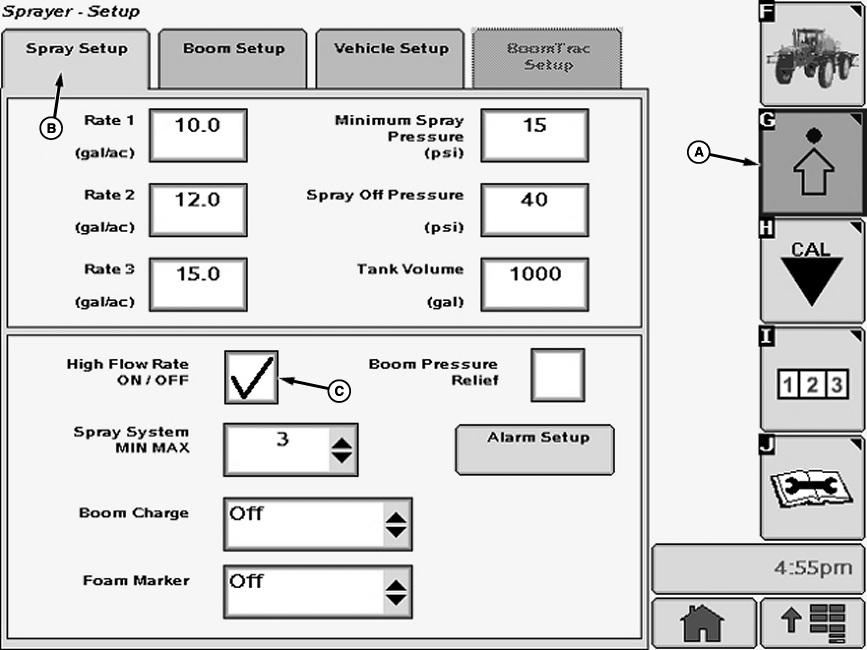
N74744-UN-12JAN07A - Setup Softkey
B - Spray Setup Tab
C - Check Box
Select the Setup softkey (A) to view the setup menu.Select the Spray Setup tab (B).
NOTE: A check mark in the box indicates that High Flow Rate is activated.
Select check box (C) next to “High Flow Rate ON / Off” and a check will appear inside box activating item. To deactivate a check box, touch check box to remove the check.
NOTE: When High flow rate is turned “ON” in SprayStar the flowmeter valve must be opened on boom. If SprayStar and flowmeter valve settings do not agree:
- Flowmeter valve open but SprayStar High Flow “OFF ” — will overapply
- Flowmeter valve closed but SprayStar High Flow “ON ” — will underapply
OUO6092,0000D80-19-20070813 |