Calibrate Boom Return To Height
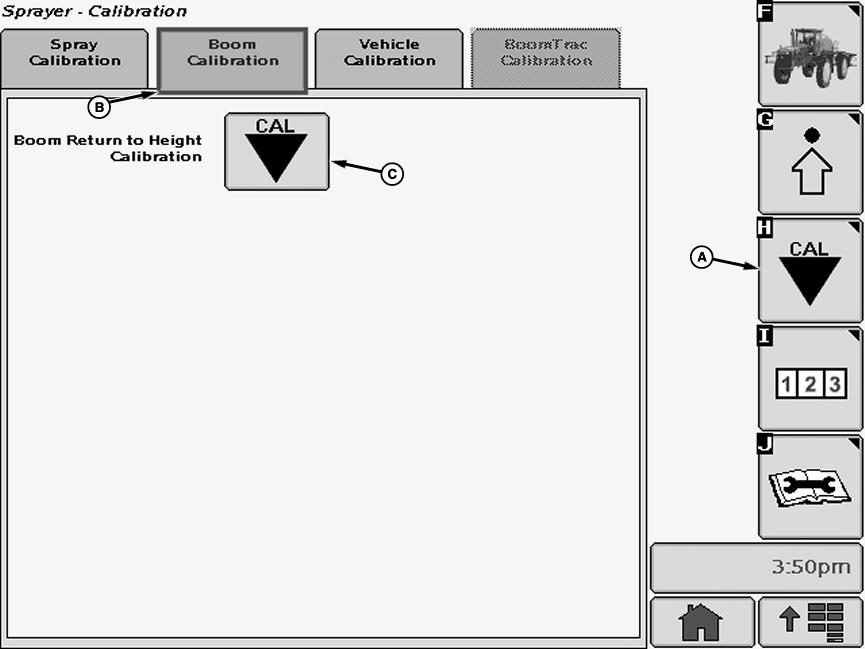
N74768-UN-18JAN07A - Calibration Softkey
B - Boom Calibration Tab
C - Calibration Icon
Select the Calibration softkey (A) to view the setup menu.Select the Boom Calibration tab (B).
Select calibration icon (C) next to Boom Return to Height Calibration. Boom Return to Height Calibration screen will appear.
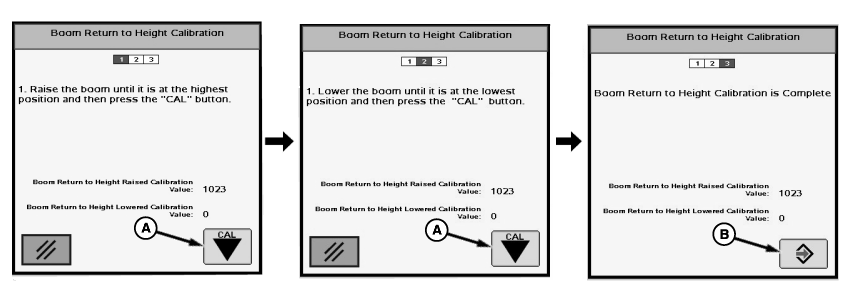
N74948-UN-02AUG07A - “Cal” button
B - Enter Button
Follow instructions on first screen. When finished select “Cal” button (A) to proceed to next screen.Follow instructions on second screen. When finished select “Cal” button (A) to proceed to next screen.
“Boom Return To Height Calibration is Complete.” will be displayed. Press Enter button (B) to return to Boom Calibration tab.
OUO6092,0000D81-19-20070716 |