Calibrating Wheel Speed Sensor
NOTE: Radar sensor or GPS speed overrides wheel speed sensor when Radar Speed or GPS Speed is selected. If using radar sensor or GPS speed, select Wheel Speed to be used for vehicle speed.
Fill the solution tank half full of water or solution.
Measure a 122 m (400 ft) course with tape measure on flat terrain that is most typical of field conditions (loose, medium, hard-packed). Do not use end rows due to possible varying ground conditions that can affect calibration.
Mark both beginning and end of course with markers that are visible from cab.
Allow enough room at each end of course for sprayer to travel entire course without speeding up or slowing down.
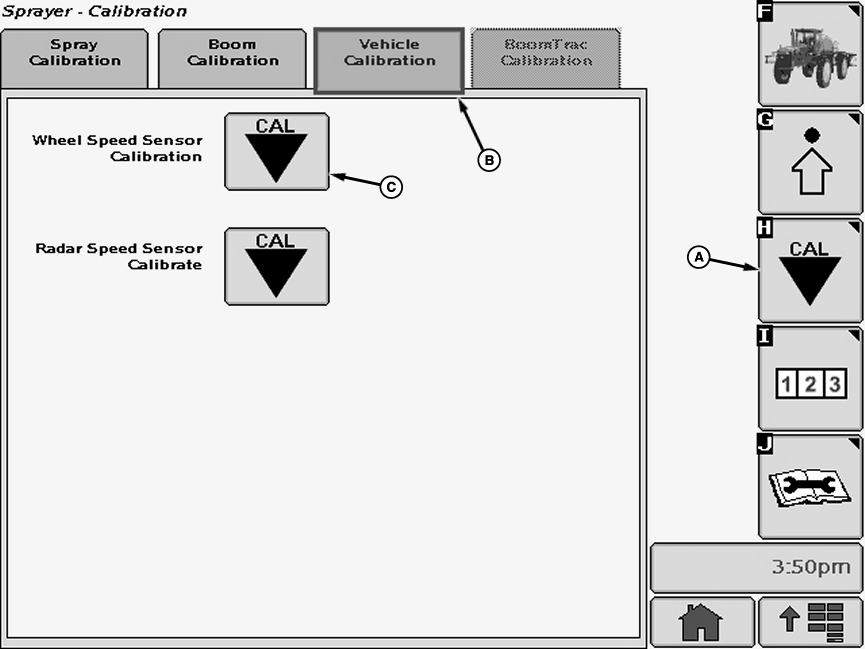
N74769-UN-18JAN07A - Calibration Softkey
B - Vehicle Calibration Tab
C - Calibration Icon
Select the Calibration softkey (A) to view the setup menu.Select the “Vehicle Calibration” tab (B).
Select calibration icon (C) next to “Wheel Speed Sensor Calibration”. Wheel Speed Sensor Calibration screen will appear.
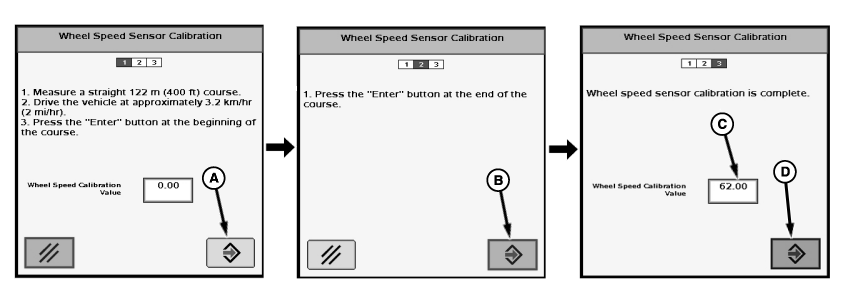
N74770-UN-18JAN07A - Enter Button
B - Enter Button
C - Input Box
D - Enter Button
Follow instructions on first screen. Start driving somewhere before beginning of the course and reach speed recommended on screen. While maintaining that speed, press “Enter” button (A) to turn wheel counter “ON” when the sprayer reaches the beginning of the course.Keep constant speed over the course, and when sprayer reaches the end marker, press “Enter” button (B)” to turn counter “OFF”.
Record calibration value that appears.
Repeat calibration two more times and record calibration values.
Average the three calibration values.
Select input box (C) next to “Wheel Speed Calibration Value”. Enter calibration average.
Press “Enter” button (D) to save entered value and return to the vehicle Calibration Tab.
To verify calibration value, measure the course with the distance counter. (See Operating Distance Counter in this section.)
If the “Distance” is anything more or less than 120—123 m (395—405 ft), refine the previous wheel calibration number as follows:
Wheel Calibration Number x Recorded distance ÷ by 122 m (400 ft) = New Wheel Calibration Number
Enter new wheel speed calibration number.
Calibration value ranges:
Standard/Narrow Tires: 48—58
Flotation Tires: 48—58
NOTE: If radar was disconnected, connect after completing calibration of wheel speed sensor.
OUO6092,0000D82-19-20070507 |