Reset Spray Calibrations to Factory Default Settings
Select the Calibration softkey (A) to view the setup menu.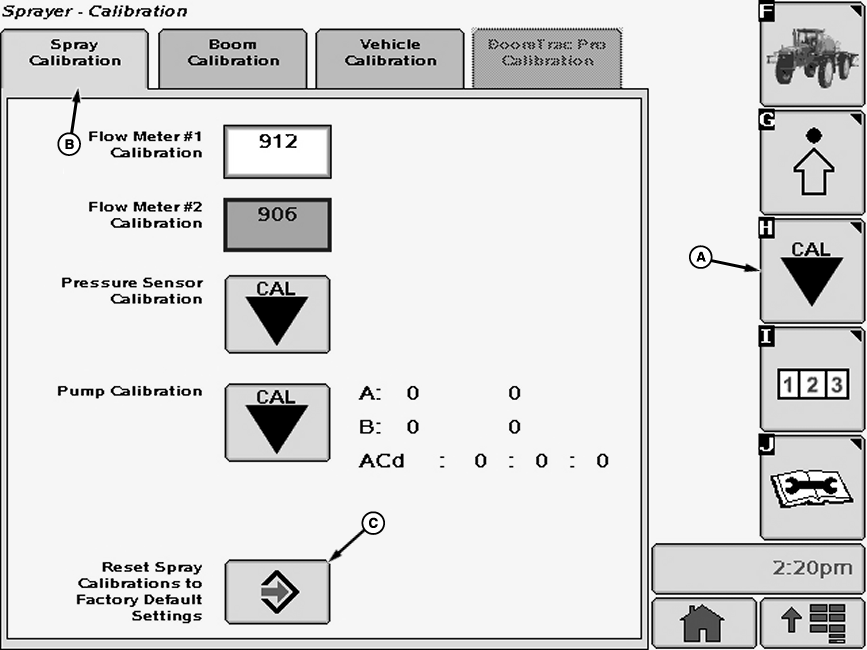
N77309-UN-15AUG07Select the Spray Calibration tab (B).
Select calibration icon (C) next to Reset Spray Calibrations to Factory Default Settings. Reset Spray Calibrations to Factory Default Settings screen will appear.
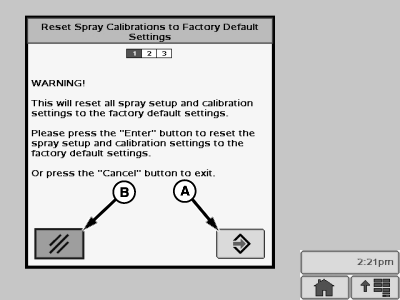
N77310-UN-15AUG07A - Enter Button
B - Cancel Button
Follow instructions on screen. When finished select “Enter” button (A) to proceed with resetting calibrations to defaults or select “Cancel” button (B) to exit.
OUO6092,0000FDA-19-20070815 |