Setting Time and Date
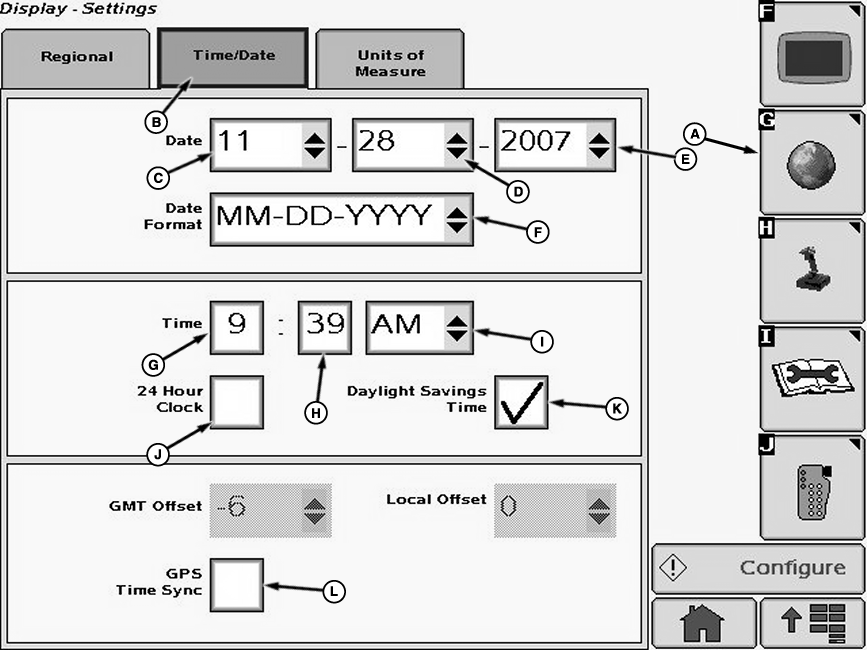
N78799-UN-28MAR08A - Settings Softkey
B - Time/Date Tab
C - Drop-Down Box
D - Drop-Down Box
E - Drop-Down Box
F - Drop-Down Box
G - Input Box
H - Input Box
I - Drop-Down Box
J - Check Box
K - Check Box
L - Check Box
Select Menu button.Select Display button.
Select Settings softkey (A).
Select Time/Date tab (B).
NOTE: If GPS Time Sync box (L) is checked, the date and time formats are updated automatically. Uncheck the box to update manually.
Select the month (C), day (D), and year (E) from drop-down menus.
Select date format from drop-down box (F).
Select input boxes (G and H) to input hour and minute figures.
Select AM or PM from drop-down box (I).
Select check box (J) for 24 hour clock option and a check will appear inside box activating item. To deactivate a check box, touch check box to remove the check.
Select check box (K) for daylight savings option and a check will appear inside box activating item. To deactivate a check box, touch check box to remove the check.
OUO6092,000108B-19-20080221 |