Calibrate Pressure Sensor
N74946-UN-01FEB07
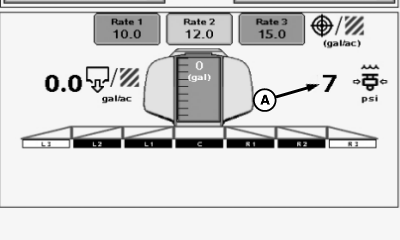
A - Pressure Reading
If pressure sensor (A) reading does not return to zero when there is no pressure or fluid in boom section shut-off valves, calibration of pressure sensor is necessary.
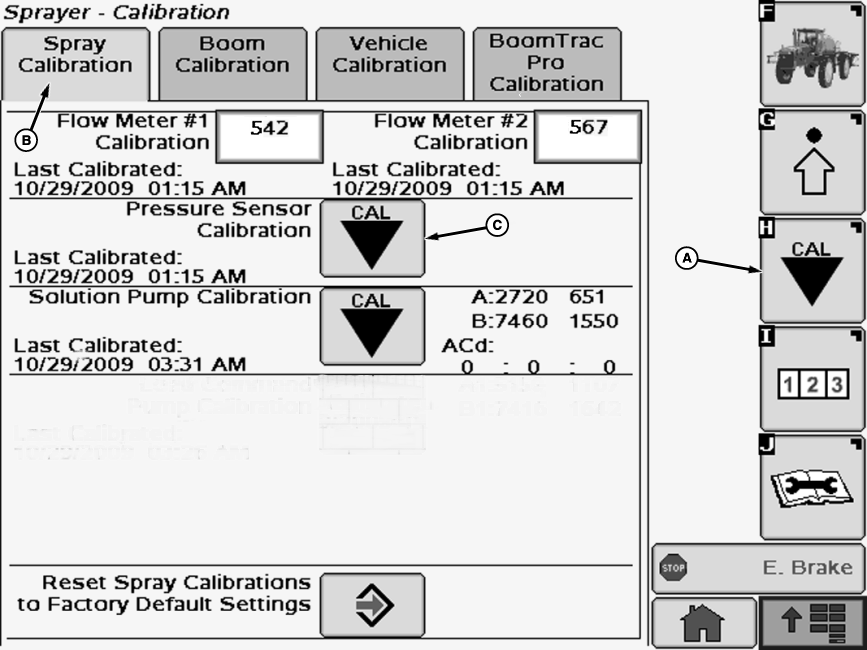
N87485-UN-25MAR10A - Calibration Softkey
B - Spray Calibration Tab
C - Calibration Icon
Select the Calibration softkey (A) to view the setup menu.Select the Spray Calibration tab (B).
Select calibration icon (C) next to Pressure Sensor Calibration. Pressure Sensor Calibration will appear.
NOTE: Allow approximately five minutes for pressure in solution pump to dissipate before removing flowmeter.
 CAUTION: Do not drain solution onto the ground. Drain into a container. Drain solution in an area where people, animals, vegetation and water supply, etc., cannot be contaminated.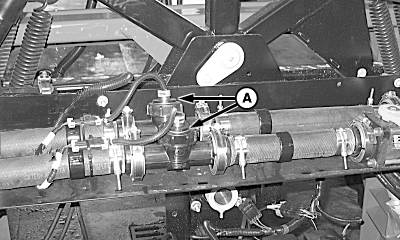
N88060-UN-06APR10A - Flowmeter Insert
Slowly remove flowmeter insert(s). Catch fluid in a suitable container.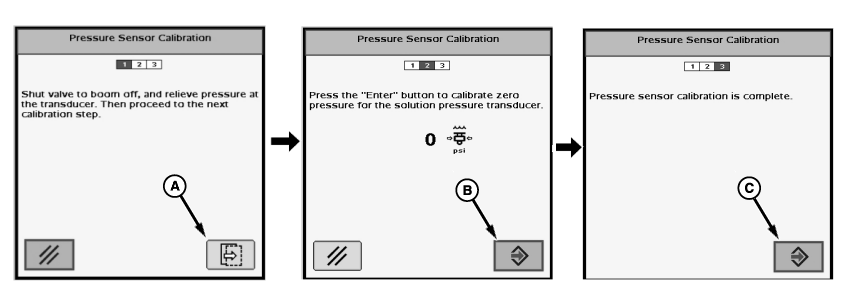
N74765-UN-18JAN07A - Button
B - Enter Button
C - Enter Button
Follow instructions on first screen. When finished select the button (A) to proceed to next screen.Follow instructions on second screen. When finished select the enter button (B) to proceed to next screen.
“Pressure sensor calibration is complete.” will be displayed. Press enter button (C) to return to Spray Calibration tab.
Reinstall insert in flowmeter.
SW97031,00000C0-19-20110419 |