Replacing Engine Fan and Accessory Drive Belt
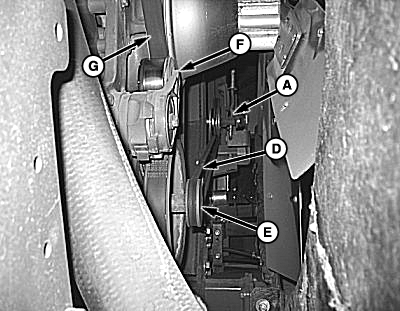
N86578-UN-26OCT09
Drive Belts
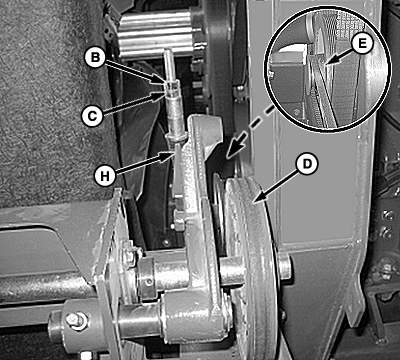
N86579-UN-26OCT09
Rotary Screen Drive Belt Tensioner
A - Rotary Screen Drive Belt Tensioner
B - Jam Nut
C - Adjusting Nut
D - Rotary Screen Drive Belt
E - Drive Sheave
F - Tensioner
G - Fan and Accessory Drive Belt
H - Tension Indicator
|
Recommended Service Interval |
|
|---|---|
|
Check Belt Tension |
Annually |
NOTE: Engine fan and accessory drive belt is equipped with an automatic tensioner which DOES NOT require adjustment.
-
Loosen jam nut (B) and adjusting nut (C) on rotary screen drive belt tensioner (A).
-
Remove rotary screen drive belt (D) from drive sheave (E).
-
Insert breaker bar in arm of tensioner (F).
-
Pull on breaker bar to relieve tension on fan and accessory drive belt (G).
-
Remove belt from fan sheave and slowly release tensioner.
-
Replace belts in reverse order of removal.
-
Adjust tension on rotary screen drive belt:
-
Tighten nut (C) until end of tension indicator (H) is within thickness of washer.
-
Tighten jam nut (B).
-
|
DP99999,000045E-19-20120213 |