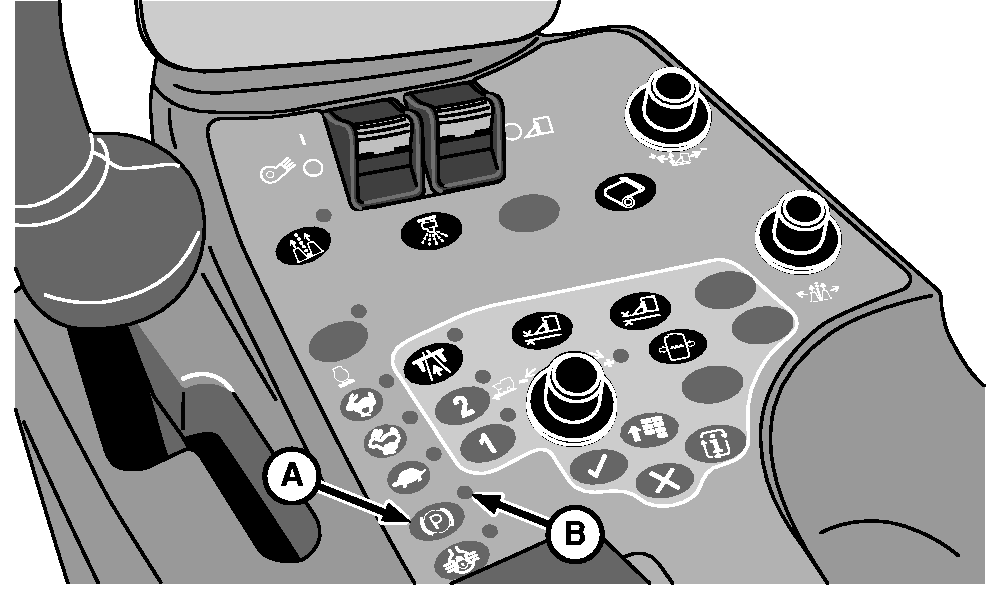
Park Brake Button
N87826-UN-26FEB10
A - Park Brake Button
B - Park Brake Indicator
The park brake has two operating modes, manual (ON) and automatic. The park brake defaults to the manual mode any time the engine is shut off.When the engine is started, the park brake remains engaged in manual mode. Park brake indicator (B) is on steady and the park brake symbol is displayed on the vehicle monitor display unit on the corner post.
To release park brake and move machine, press park brake button (A). Park brake indicator starts flashing and symbol on vehicle monitor display goes off. Park brake is now engaged in automatic mode.
Automatic Mode:
In automatic mode, park brake is released and park brake indicator goes off when multifunction control handle is moved from neutral to forward or reverse. When handle is moved back to neutral and ground speed is less than 3 km/h (1.9 mph), park brake is applied.
When engine is shut off, park brake engages in manual mode. To engage park brake in manual mode with engine running, press park brake button.
Manual Mode:
Park brake manual mode allows the operator to move the multifunction control handle forward while the engine is running and the machine remains stationary. The manual mode is used when warming up row units or operating units to remove excess cotton. The manual mode is also used if the operator must leave the cab with the engine running.
|
DP99999,0000529-19-20111205 |