Driving Machine
 CAUTION: Machine is heavy. If machine should move suddenly forward
or backward, serious injury or death can result to you or others.
Be sure that all people and objects are safely away from the machine
before driving.
CAUTION: Machine is heavy. If machine should move suddenly forward
or backward, serious injury or death can result to you or others.
Be sure that all people and objects are safely away from the machine
before driving.
-
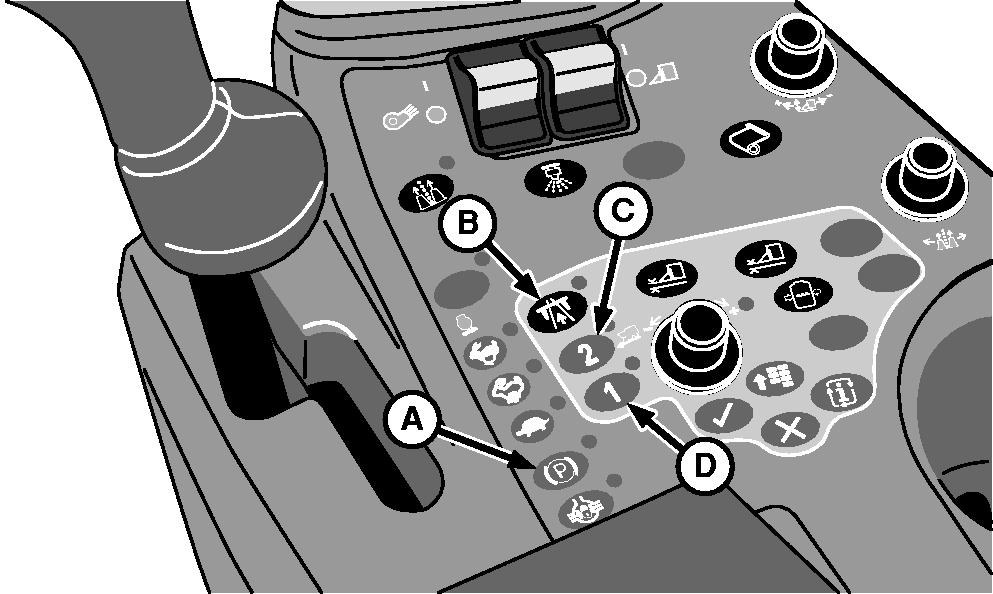
N88047-UN-18MAR10A - Park Brake Button
B - Road/Field Mode Button
C - Range 2 Button
D - Range 1 Button
Set brake latch in desired position (field or transport). (See TRAVEL BRAKE PEDALS in Operator's Station section.) -
Push park brake button (A). Park brake indicator starts flashing. Park brake is now in automatic mode and will release when multifunction control handle is moved from neutral to forward or reverse.
-
For highway travel push road/field mode button (B). Indicator light comes on and transmission is engaged in range 1. For field operation, indicator light is off.
Machine Travel Speeds
Travel Speeds
Mode
Operation
Range
Button
Km/h (mph)
Field
Picking
1
D
0—6.8 (0—4.2)
Field
Scrapping
2
C
0—8.1 (0—5.0)
Road 1
Field Transport
1
D
0—14.5 (0—9.0)
Road1
Road Transport
2
C
0—27.4 (0—17.0)
-
NOTE: To ensure full output from air system, always place throttle at maximum throttle position when picking cotton.
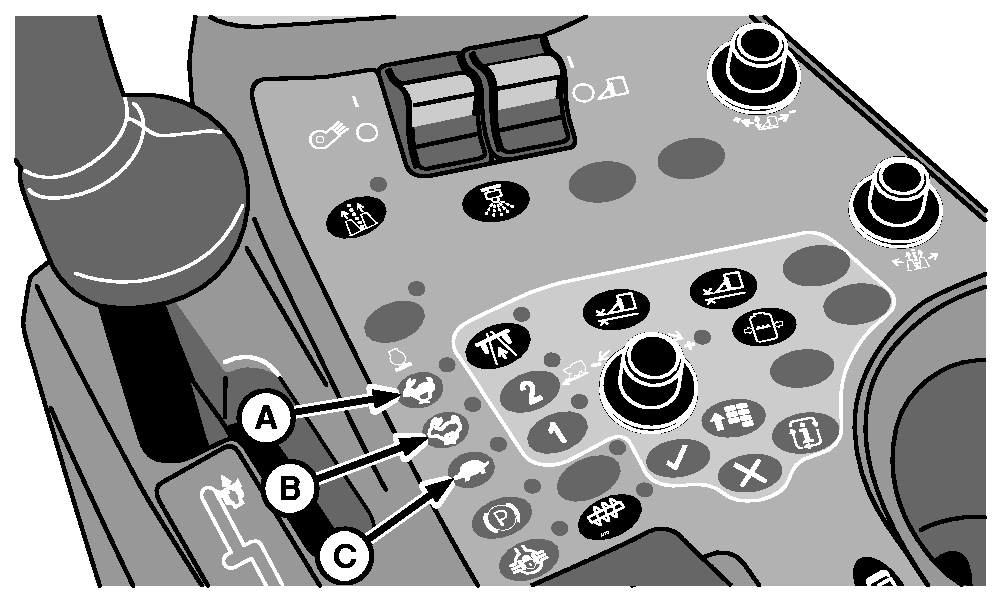
N85623-UN-19JUL10A - High Engine Speed
B - Medium Engine Speed
C - Low Engine Speed (Idle)
Push desired engine speed button (A—C).- Button A: High Speed — 2200 rpm
- Button B: Medium Speed — 1750 rpm
- Button C: Low Speed — 900 rpm
-
IMPORTANT: If hydrostatic charge pressure warning on armrest display unit comes on when multifunction control handle is moved, check hydraulic oil level or replace filter. (See your John Deere dealer if problem is not corrected.)
Move multifunction control handle forward for forward travel or rearward for reverse travel.
-
Move multifunction control handle forward for forward travel or rearward for reverse travel.
|
1 Road/Field Mode button activated.
Indicator light ON.
|
DP99999,000054B-19-20100323 |