Reacting to a Plugged Row Unit
N88166-UN-25MAR10
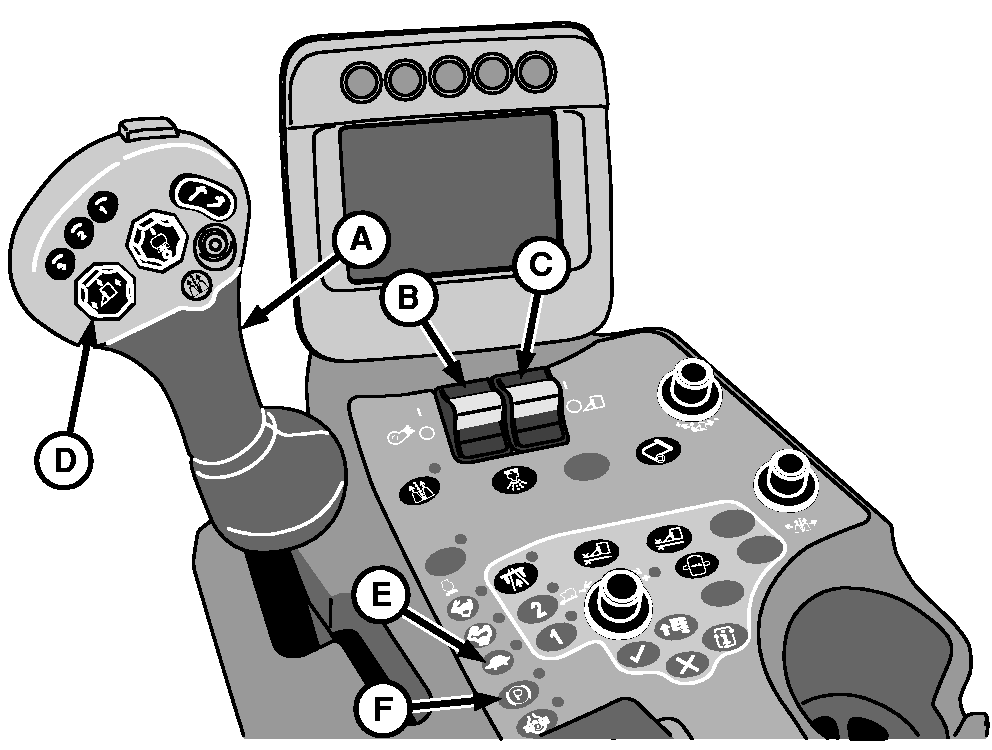
A - Multifunction Control Handle
B - Fan Switch
C - Row Units Switch
D - Row Units Raise/Lower Button
E - Low (Idle) Engine Speed Button
F - Park Brake Button
When an obstruction enters and plugs a row unit, the drum clutch slips, causing an alarm to sound and a full screen warning to appear on the armrest display unit with a pictorial representation of the plugged unit.
When an obstruction occurs:
-
Move multifunction control handle (A) to neutral and apply brakes to stop machine immediately.
-
Move fan switch (B) and row units switch (C) to OFF.
-
Press up arrow on row units raise/lower button (D) and raise units partially.
-
Back machine up approximately 2 m (6 ft.).
-
Place multifunction control handle in neutral.
-
Press low engine speed button (E) to reduce engine speed to slow idle.
-
Press park brake button (F).
-
Lower units to the ground or onto unit safety stops.
-
Shut off engine and remove key.
-
Inspect units and remove obstruction. (If obstruction can not be easily removed, see UNPLUGGING A ROW UNIT in this section.)
|
DP99999,0000553-19-20100322 |