Adjusting Wrap Load Arms
N88390-UN-19APR10
N88391-UN-19APR10
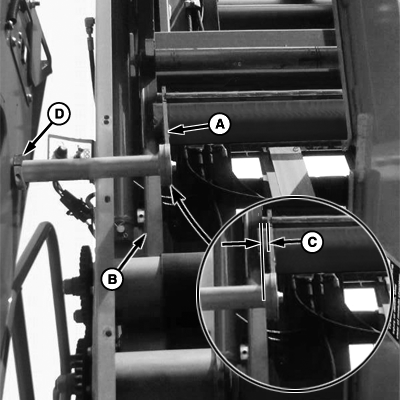
A - Wrap Load Arm
B - Hoist Channel
C - Clearance, 3 mm (1/8 in.)
D - Collar
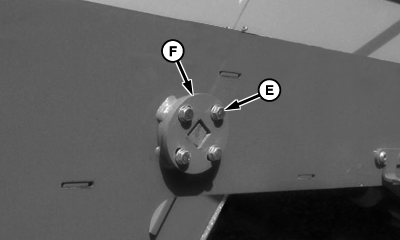
E - Cap Screw (4 used)
F - Retaining Plate
Wrap load arms are adjusted at the factory for proper alignment. However, adjustment in the field may be necessary under the following conditions:
- If any interference between wrap load arms and hoist channel is noticed during normal wrap load cycle.
- When handler is fully raised with wrap roll in load arms and wrap roll core is not centered , front to rear, in the hoist channel.
- After replacing a lost or damaged wrap load arm.
Adjust wrap load arm position as follows:
-
Start machine and enter load wrap mode. (See LOADING MODULE BUILDER WRAP in this section.)
-
Raise scissor lift (hoist) all the way up using tether control.
-
Lower handler.
-
Remove wrap load arms from storage position and install in wrap load position.
-
Load empty or partial roll of wrap in load arms.
-
Raise handler and observe clearance between wrap load arm (A) and hoist channel (B) on each end of wrap roll.
-
Clearance (C) must be at least 3 mm (1/8 in.). To adjust clearance, loosen collar (D), move arm inward or outward as required, and tighten collar.
-
Raise handler to full up position.
-
Check position of wrap roll in hoist channel. When properly positioned, core of roll is centered in channel or just touching front leg of channel.
-
If necessary, adjust position of roll as follows:
-
Loosen cap screws (E).
-
Rotate retaining plate (F) to move roll forward or rearward as required.
-
Tighten cap screws.
-
Repeat for opposite end of roll.
-
-
Lower handler and remove wrap roll used during adjustment.
-
Return wrap load arms to storage position.
-
Raise handler.
-
Exit load wrap mode.
|
DP99999,000058C-19-20100426 |