Operator Interface Controls
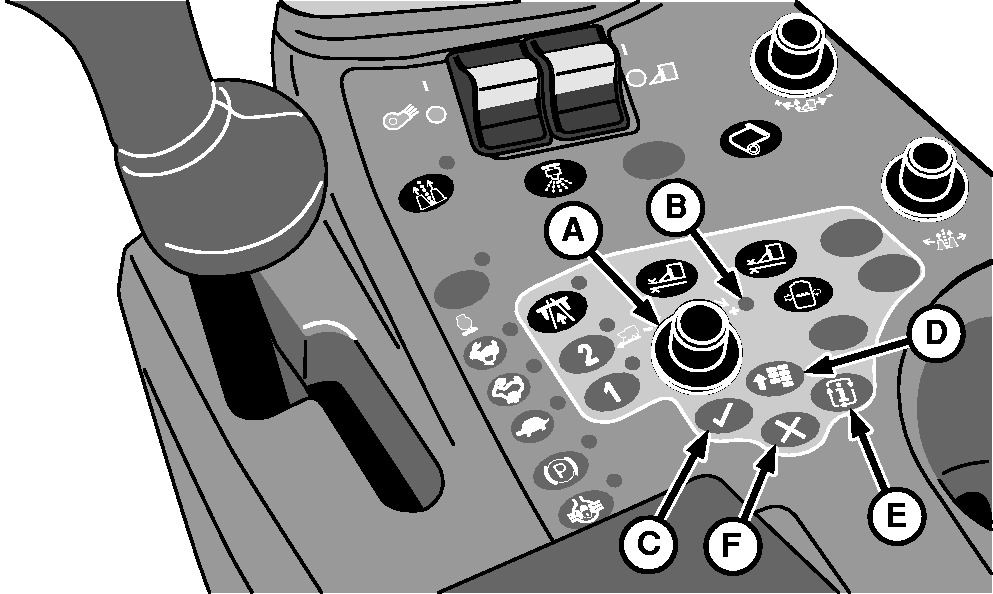
N87829-UN-26FEB10
A - Selection Dial
B - Indicator Light
C - Confirm Button
D - Main Menu Button
E - Mode Select Button
F - Cancel Button
Selection DialSelection dial (A) is used to select from the available interactive options on display screens or menus on the armrest display unit (ADU). As the dial is rotated, options are sequentially highlighted on the display. When an item is highlighted, a tool tip describing the function of that item appears briefly. The selection dial is also used to increase or decrease numeric values of selected machine settings on the ADU.
Indicator Light
Indicator light (B) indicates that the selection dial can now be used to move to the desired item or setting on the screen or adjust the selected setting.
Confirm Button
Confirm button (C) is used to select the highlighted item on the ADU, enter or save a setting, or to confirm an action.
Main Menu Button
Main menu button (D) is used to access the main menu on the ADU. The main menu allows the operator to change display settings or view information from the following categories:
- Display Settings
- Diagnostic Address Information
- Diagnostic Trouble Code Information
- Controller and CAN Bus Information
Mode Select Button
Mode select button (E) activates the service mode selection screen on the ADU. The service mode selection screen allows the operator to select the tether operation, onboard lubrication, or load wrap service mode.
Cancel Button
Cancel button (F) allows the operator to cancel an action on the ADU at any time.
|
DP99999,0000765-19-20110620 |