Home Page Screens
N92986-UN-15JUN11
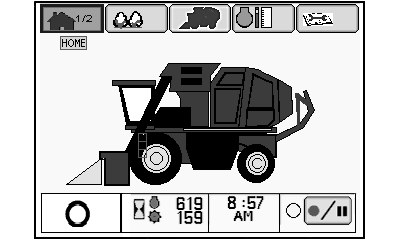
Screen 1 of 2
N92987-UN-16JUN11
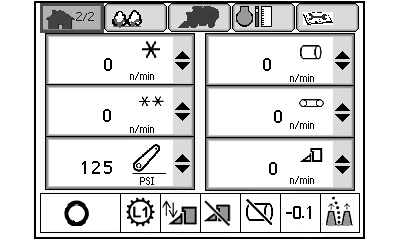
Screen 2 of 2
Home Page Screen 1The following information is shown on screen 1 of the home page. To move to screen 2, select home page icon using selection dial and press confirm button.
- Machine operating mode icon
- Engine operating hours
- Fan operating hours
- Time of day
- Harvest monitor recording enable button
Home Page Screen 2
Any six of the following parameters can be displayed on screen 2 of the home page. The parameters displayed by default are as noted. To display a different item in any of the six display boxes, highlight the box using selection dial on control console and press confirm button. Select desired item from drop-down menu and press confirm button to change display.
- Module size
- Module builder speed (right column default)
- Beater roller speed (left column default)
- Feeder conveyor belt speed (right column default)
- Engine speed
- Fan speed
- Metering roller speed (left column default)
- Rockshaft pressure (left column default)
- Row units speed (right column default)
- Wrap count
- Round module count (lifetime total)
- Engine hours and fan hours
- Time of day and date
A status bar at the bottom of the screen displays the following:
- Machine operating mode
- Transmission mode
- Header height control system on-off status
- Row units on-off status
- Module builder status
- Guidance system offset value
- Guidance system on-off status
|
DP99999,0000767-19-20120124 |